

NexFoto 24 Inch Large Digital Picture Frame Touchscreen, WiFi Electronic Photo Frame 64GB, Add Photos from Google Photos, Videos via App/USB, Gifts for Christmas/Mom/Grandparents, White
$299.99
Related Products






Product description

 The Newest Way to Stay Connected
Let’s gather friends and family to create a shared album! Enjoy liking, commenting, and celebrating life’s magical moments together. Join the private social circle to stay close to your loved ones.
 An Ideal Gift for Loved Ones
This adorable gift will be loved by everyone, making it a perfect gifting option for any occasion. NexFoto digital frames come in a beautiful gift box, ideal for anyone in your family.


1 Quick Connection
2 Photo Upload
3 Photo Editor
4 Smartphone Control
5 Data Security


 Elite FHD Display with Touch Screen
Featured with an IPS extra-wide viewing angle display, all your treasured memories will be presented in stunning image quality with vivid colors and crisp details.
 Smart Rotation for Flexible Display
Our frame can be placed on the table in landscape or portrait or you may also hang it on the wall. The images will automatically rotate according to the orientation for the best fit.
 Built-In Professional Bluetooth Speakers
Artistic living with beautiful sound and vision.
 Showcase Your Personal Gallery
With the NexFoto App, you can access a huge collection of original art from around the world. Showcase your favorites at home and let the entire art collection come to life, just like in a museum!
 2.4GHz/5GHz Dual-Band
NexFoto digital frame is compatible with 2.4GHz and 5GHz, with faster transmission and higher efficiency.


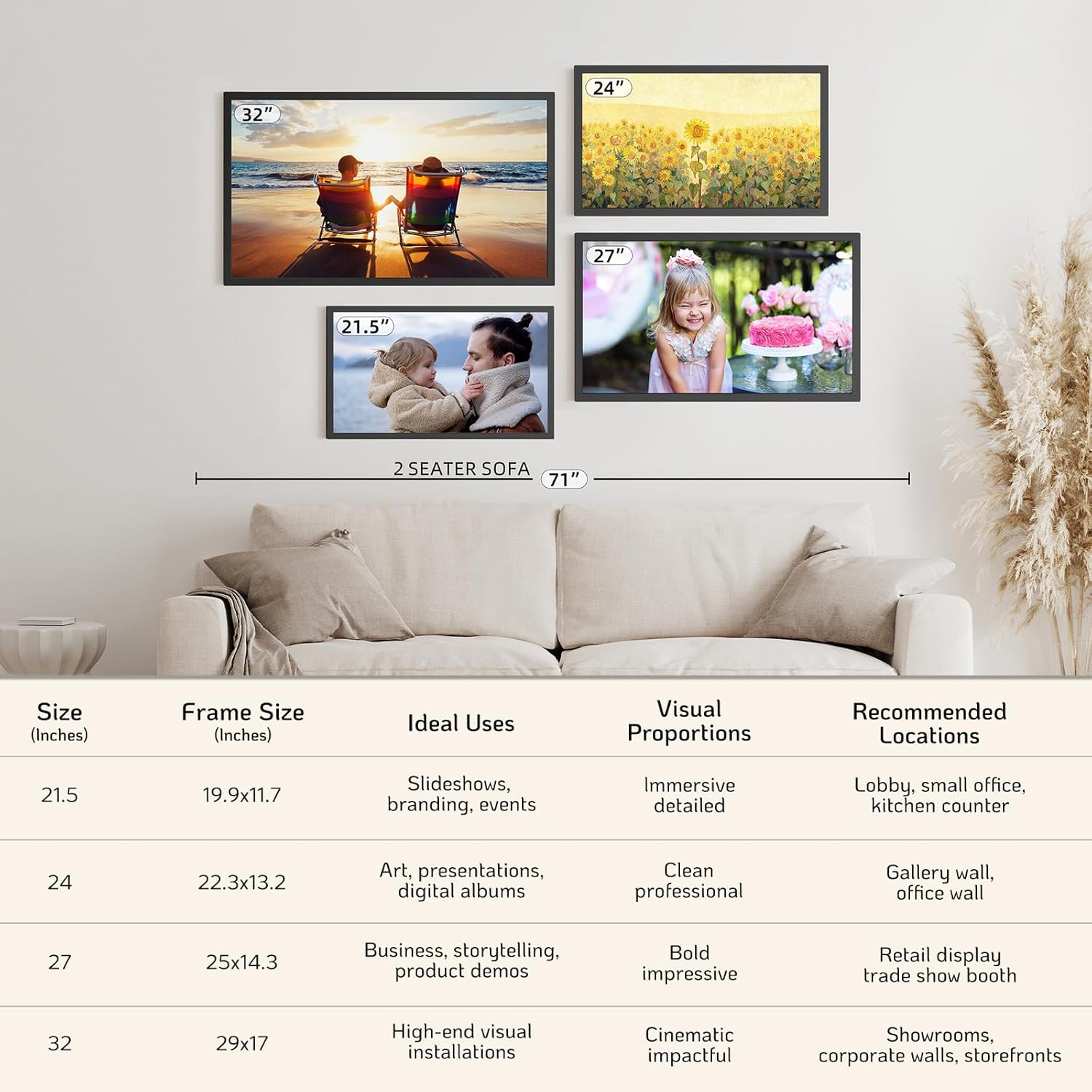
 Multiple Sizes Available
Multiple sizes meet your different needs, find your perfect fit!
Which is right for you?
Add to Cart
Add to Cart
Add to Cart
Add to Cart
Add to Cart
Customer Reviews
4.2 out of 5 stars 202
4.2 out of 5 stars 202
4.2 out of 5 stars 202
4.0 out of 5 stars 373
4.0 out of 5 stars 373
4.0 out of 5 stars 373
4.2 out of 5 stars 202
Price
$299.99$299.99
$355.99$355.99
$299.99$299.99
$449.99$449.99
$199.99$199.99
$79.99$79.99
$339.99$339.99
Display Size
24 inch
24 inch
24 inch
32 inch
21.5 inch
10.1 inch
27 inch
Overall Size
13.2″ W x 0.8″ D x 22.3″ H
13.2″ W x 0.8″ D x 22.3″ H
14.8″ W x 1.4″ D x 23.8″ H
17.04″ W x 1.26″ D x 28.98″ H
11.7″ W x 0.9″ D x 19.91″ H
7.22″ W x 0.94″ D x 10.4″ H
14.8″ W x 0.8″ D x 25″ H
Resolution
1920 x 1080 FHD
1920 x 1080 FHD
1920 x 1080 FHD
1920 x 1080 FHD
1920 x 1080 FHD
1280 x 800 HD
1920 x 1080 FHD
Aspect Ratio
16:9
16:9
16:9
16:9
16:9
16:10
16:9
Touch Screen
✔
✔
✔
✔
✔
✔
✔
Uploading Options
APP, USB Type-B, Micro SD Card
APP, USB Type-B, Micro SD Card
APP, USB Type-B, Micro SD Card
APP, USB Type-B, Micro SD Card
APP, USB Type-B, Micro SD Card
APP, USB Type-B, Micro SD Card
APP, USB Type-B, Micro SD Card
Sync with Google Photos
✔
✔
✔
✔
✔
✔
✔
Free Unlimited Cloud Storage
✔
✔
✔
✔
✔
✔
✔
Gift Pre-Setup & Greetings
✘
✘
✘
✘
✘
✔
✘
Swivel Wall Mount Bracket
✔
✔
✔
✔
✔
✘
✔
Wi-Fi
2.4GHz & 5GHz
2.4GHz & 5GHz
2.4GHz & 5GHz
2.4GHz & 5GHz
2.4GHz & 5GHz
2.4GHz & 5GHz
2.4GHz & 5GHz
Internal Memory
64GB
64GB
64GB
64GB
64GB
64GB
64GB
Showcase Your Personal Gallery: NexFoto wifi digital picture frame (compatible with 2.4GHz and 5GHz) makes it effortless to upload photos and videos from your phone. You can easily explore a diverse range of visual art, including masterpieces and NFT art. With its minimalist modern design, this electronic picture frame blends seamlessly into any decor, enhancing your space. The extra large digital photo frame can be freestanding or wall mounted, and its wall-mounted design features a swivel mount for easy rotation. Whether you’re displaying family memories or an art exhibition, NexFoto turns your wall into a living masterpiece.
24 inch Touch Screen and 64GB Memory: The NexFoto 24-inch digital photo frame features 1920 x 1080 FHD Glossy Touch Screen (aspect ratio 16:9) that showcases your memories in vibrant colors and sharp details, while the IPS display technology brings much wider viewing angles. This digital picture frame features 64GB internal memory, and it supports mirco SD card extended storage (up to 64GB, not included). Enjoy cloud-based storage convenience, absolute privacy and security. Besides, we give you a USB flash drive
Impressive Functions & Easy Setup: NexFoto digital photo frame allows users to upload pictures from Google Photos to the frame via the NexFoto app. Multifunctional custom settings, sush as caption, slideshow playlists, weather, calendar, clock and sleep mode, meeting your various needs. The video picture frame features an user-friendly interface, making it easy to use for people of all ages. You can use the built-in photo editor in the NexFoto app to preprocess your photos and videos and ensure stunning results.
Perfect Gifts Choice for Loved Ones: NexFoto digital frames with an exquisite gift-ready box, instantly update your life moments and send instant or timed wishes to electronic photo frame at anytime and anywhere. This digital photo frame can be as a perfect gift for Mother’s Day, Father’s Day, Christmas, Birthdays, Weddings, Housewarmings, Anniversaries, Valentine’s Day or any special events. What they received was not just a digital photo frame, but also your love, care and company, help you stay connected with your loved ones.
Premium Quality & One-Year Warranty: NexFoto is committed to delivering top-quality digital photo frames in the industry. Our one-year warranty allows you not to worry about any problems with the product. If you have any questions, our team is available to provide the most satisfactory response within 12 hours. We go beyond just selling great products, we strive to provide an exceptional service experience to ensure that every customer is happy with their purchase
13 reviews for NexFoto 24 Inch Large Digital Picture Frame Touchscreen, WiFi Electronic Photo Frame 64GB, Add Photos from Google Photos, Videos via App/USB, Gifts for Christmas/Mom/Grandparents, White
Add a review

$299.99
NANDINI –
Digital photo frame
The Best Buy ever
goosedad –
NexFoto 15.6 in Digital Photo Frame
I have tried out a few digital photo frames, and NexFoto is one of the best in photo management.Pros:_64GB memory, and a motion sensor._Screen color saturation is good, and speaker sound is acceptable._Photos can be transferred from a cell phone APP. Support USB, MicroSD, and USB-C for pc._Photos/Videos can be copied from USB(64GB USB is included), MicroSD into separate albums. I named my albums by year/place/friends/family. It is convenient to slide show the albums on the Playlist. If you have thousands of photos on the frame and don’t have individual albums, it will take a while to view your desired photos._Software update. NexFoto’s support team welcomes users’ feedback and comments, and will implement appropriate changes._Great customer service and technical support team!Cons:_I have two software updates on my frame. The software has improved.However, the delay in response when the selection is pressed on the touchscreen may cause the user to press the selection multiple times. If this happens, an error message will appear: ‘Nexfoto isn’t responding. Close APP or wait.’This message can be annoying if it appears too frequently.I hope a fix is included in the next software update.
jeff white –
Great product! Wife loved it.
Amazing
Irene L. –
Lots of Frustrations
It started out fine but then the pictures started to lock up whereby they would not move to the next one. Plus both my husband and I kept looking for a save button to save changes we made like “fit to screen” but there was none to be found so the changes would not stick. I even searched online and it said to click on the save button on the screen. But there was none Save Button! But why we really gave up on this was because there was something wrong with the software. Even the clock changed on its own.
Mikelford –
Enjoyed by My Family
Yes has met all my expectations plus very helpful customer service.
Joseph Hanson –
Bad software/UI but great screen for the price
PROS:1) VIBRANT! I’m a photographer who takes very vibrant photos and this screen does my work justice. It is not quite as good as an expensive tablet but close and incredibly good for the price.2) It woks.3) All cons could in theory be fixed in software updates.CONS:1) You can have multiple galleries but it ignores that and treats them all as one gallery and cycles through them all.2) Strangely there is not option to not have a transition, to simply have photos change instantly.3) No option to control the speed of transitions.4) Grid layout would be nice it puts some spinning circle quote that you have no control over nor can remove that I can find. Why the heck is that there??????5) App (android) is really buggy, especially when it comes to adding photos. To add photos from my phone I need to select the desired photos, hit the back button to close the selection screen, it will instantly re-open so I have to hit back 2 more times, then I get another selection screen that is white instead of black where I have to select which of the photos I selected that I want to have selected, then I can confirm.THINGS TO KEEP IN MIND:1) Pretty much any USB stick will not fit in the USB port. As a workaround they do include a really thing USB stick but this thing became incredibly hot to the touch within a few minutes so I’m afraid to use it. Best to avoid USB all together.
Dianna –
Great gift
My mother-in-law is in a nursing home, my husband and I purchased this for her and she loves it.
Bob s –
Poor shuffling and uploading lots of pictures didn’t work well
The shuffle doesn’t work well and nexfoto tech support said they know and will work on it in the future. Uploading 50 pictures at a time is really bad if you have lots of pictures and the upload feature isn’t designed well for lots of pictures. What’s good? Nice picture display. Motion detection works well. If you have lots of pictures I’d look at other options
Hopefully useful –
What a great idea to share photos/ short videos with those who don’t use social media!This device really looks just like a regular picture frame, and can be placed on a table (using the stand) or can be mounted vertically or horizontally on the wall.(just remember it needs to be plugged into the wall via the long cord)The screen is clear and sharp and very bright (the brightness is adjustable).The display is a touchscreen to make it easier to use, and I was impressed by how sensitive and responsive the touchscreen was. It allows the user to cycle through menus such as the local weather and a clock function (with choice of clock displays and an alarm feature if desired). It even offers music playback of media from the USB port or SD card.I wasn’t overly impressed by the VPhoto app, but once the frame is configured initially you don’t really need to use it for the main purpose of this frame – sharing of photos!You simply need to add the email address of someone you want photos from – this then will trigger the device to email them with the unique email address of the picture frame. Once added to the approved list, that user can then simply email photos/videos they want to share directly to the picture frame. It is really very simple to do.Now Grandma can see photos of the grandkids without fussing with emails or social media – the photos will play as a slideshow on the frame. Highly recommended for the less computer savvy!
Kitster –
I’ve been looking for a way to display some of my vacation memories full time – to give me something to keep me going through the long work days in between vacations ;-p. This NexFoto picture frame fits the bill perfectly! From ease of setup, to ease of use, to feature set, and even to the related app, this frame has been an absolute joy to use and see. I love the fact it has so many ways to get photos/videos/music to the frame, from SD card, to USB stick/drive, to direct to computer, but my favorite is direct over wifi through the app. I love being able to pick photos and videos directly from my phone’s photo roll and fire it over the internet to the frame, from ANYWHERE! And the fact it plays sound with the videos (if desired) is a huge plus. The touch screen interface is very responsive, and very easy to use and intuitive. It’s nice that this can double as an alarm clock, a display clock, and has realtime weather display as well. Honestly – it is sooo much better than the old frames that simply had an SD card slot and nothing more. It can also be powered by USB, although the one quirk I ran into is when powering with the USB-C cable (versus the included charging plug), there was no sound output. Anyways, this is a great value at $99 IMO, but if you can get the coupon ($20 off at time of writing), it becomes a phenomenal value! 100% recommend!
Tomoya –
I recently purchased the NexFoto 10.1 Inch WiFi Digital Picture Frame, and I am thoroughly impressed with its performance and features. This digital photo frame has exceeded my expectations in terms of functionality and convenience.First and foremost, the 10.1-inch IPS touch screen display provides vibrant and clear images, making every photo come to life. The touch screen interface is user-friendly, allowing me to navigate through photos and settings with ease. Additionally, the frame supports both photos and videos, allowing me to enjoy a variety of multimedia content.One of the standout features of this digital picture frame is its WiFi connectivity. With the NexFoto app, I can easily share photos and videos from my smartphone or tablet directly to the frame, no matter where I am. This feature makes it incredibly convenient to keep the frame updated with the latest memories and moments.I also appreciate the wall-mountable design of the frame, which allows me to display it prominently in my home without taking up valuable space. The sleek matte black finish complements any decor style, adding a touch of modernity to any room.Overall, I highly recommend the NexFoto 10.1 Inch WiFi Digital Picture Frame to anyone looking for a high-quality, versatile, and easy-to-use digital photo frame. Whether as a gift for grandparents or for personal use, this frame is sure to impress with its excellent performance and features.
Tres bien comme tout ce qui est Otter box –
Fonctionne bien ,les explications sont un brin compliqué, même en anglais.Mais pour le look il est très bien
Nailway Station –
The frame is “touch screen” but the keyboard to add or invite users is not, so you have to use the remote to enter addresses in, which is very frustrating. The app is completely useless: 1] Can’t see the photos on the frame. 2] Can’t add or invite people. 3] Can’t manage any settings on the frame. 4] No video tutorials available on how to manage the settings to even find out if these things are available somehow. 5] Contacted support 3 days ago and have not received a reply.