

10.1 inch Wall Planner Digital Calendar & Chore Chart,Smart Touchscreen Interactive Display for Family Schedules,Hearth Display Digital Calendar, Digital Photo Frame Share Moments from Anywhere
$18.99
Related Products




Product description


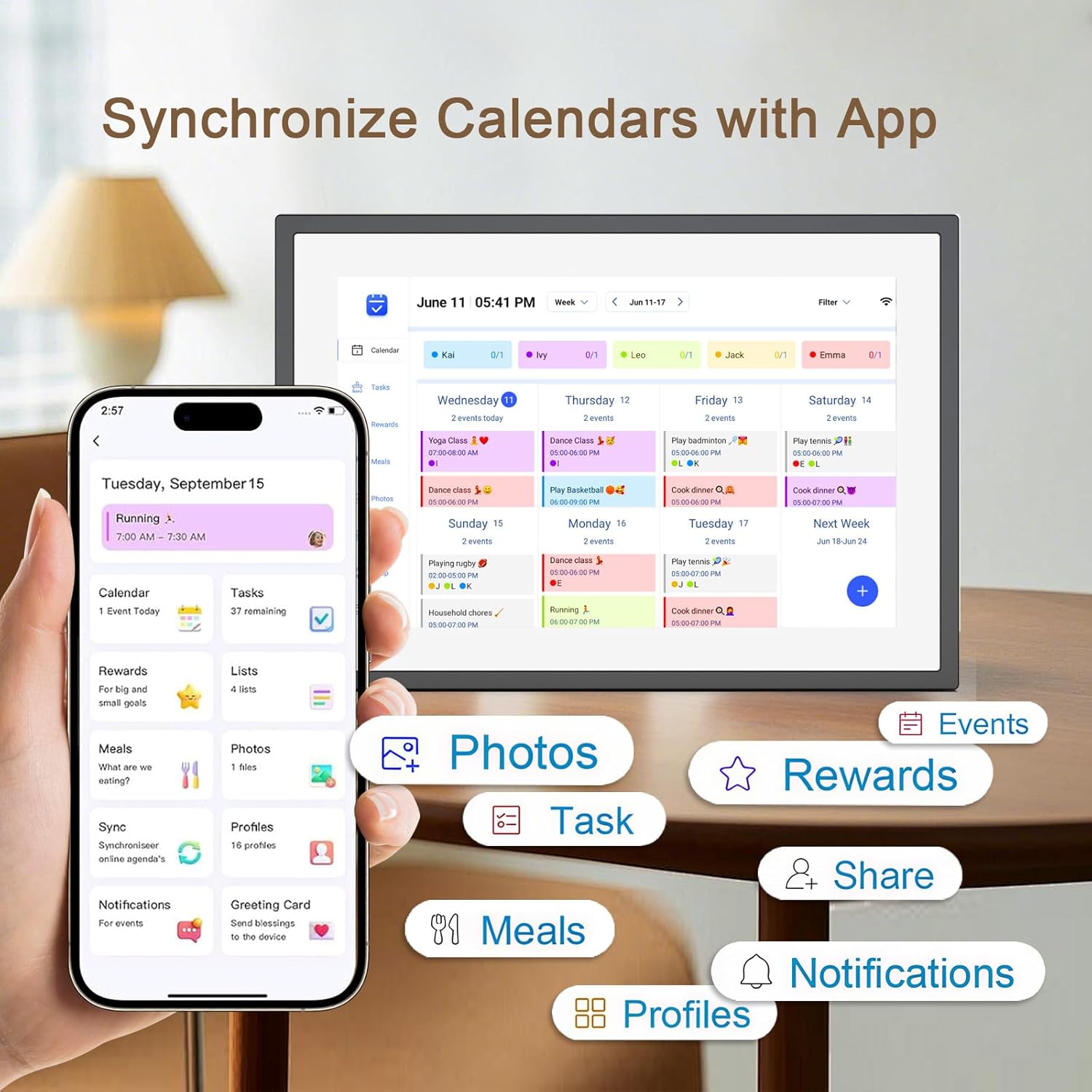
1 Chore Chart 2 Grocery List 3 Star Rewards 4 Dinner Plan 5 Event Syncing


Operation Video How to set and bind your calendar
1.Set up Digital Calendar. 2.Scan the code to download the eCalendar App on your phone.
3.Set up your email address to generate a code. 4.Digital Calendar input code to bind your phone.
5.Start using your Digital Calendar
The video showcases the product in use.The video guides you through product setup.The video compares multiple products.The video shows the product being unpacked. 10.1 inch Wall Planner Digital Calendar Merchant Video
How to Add Chores
Digital Calendar Add Chores
1.Click on the “+” to add Chores 2.Name chores, set date and time 3.Add members and assign chores, or assign chores to already added members
App add Chores to syn to Digital Calendar
1.Click Chores 2.Add new members 3.Click “+” to enter chores name, set the date and time 4.After saving, it can be syn to Digital Calendar
The video showcases the product in use.The video guides you through product setup.The video compares multiple products.The video shows the product being unpacked. 10.1 inch Wall Planner Digital Calendar Merchant Video
iCloud schedule sync to Digital Calendar
1.Click “Sync” 2.Select Email Account 3.Click “iCloud” 4.Copy email address
5.Open calendar 6.Click “Calendar” and select “Public Calendar”
7.Click “Share link” 8.Click “email” 9.Paste email address to the sender and send email
10.iCloud schedule Sync to Digital Calendar
The video showcases the product in use.The video guides you through product setup.The video compares multiple products.The video shows the product being unpacked. 10.1 inch Wall Planner Digital Calendar Merchant Video
Google schedule sync to Digital Calendar
1.Click “Sync” 2.Click “sync New Calender” 3.Click “Google”
4.Select “Two way sync” 5.Enter email number 6.Select language, click continue
7.Select email, click “sync calendar”
The video showcases the product in use.The video guides you through product setup.The video compares multiple products.The video shows the product being unpacked. 10.1 inch Wall Planner Digital Calendar Merchant Video
How to add lists and events
How to add lists
1.Click on the list 2.Add list 3.Name the list and add event 4.Click on it after completing the task
How to add events
1.Click “+” to enter the event 2.Set the start time and end time 3.Add members
The video showcases the product in use.The video guides you through product setup.The video compares multiple products.The video shows the product being unpacked. 10.1 inch Wall Planner Digital Calendar Merchant Video
How to send photos
1.Click “Photos”
2.Click image icon
3.Select the connected Digital Calendar and click “Pick from Gallery”
4.Select image, confirm and send
The video showcases the product in use.The video guides you through product setup.The video compares multiple products.The video shows the product being unpacked. 10.1 inch Wall Planner Digital Calendar Merchant Video

【All-In-One Digital Calendar】: WiFi digital calendar + planner touchscreen display + digital picture frame that will get the whole family organized and running smoothly. It’s never been easier to keep the whole family informed by assigning each member their own color and chores. (NOTE : Can Not Wall Mount)
【Versatile Family Assistant】: This versatile digital calendar planner goes beyond a calendar; it helps you create meal plans, access recipes, and watch cooking tutorials. With touch screen, you can easily access smart home apps to control your existing devices. It also serves as a digital picture frame to showcase cherished family memories.
【Easy Setup & Use】: Simply plug it in, connect to Wi-Fi, and sync your calendars – all your events will automatically populate and sync. Synchronize with the internet time servers to ensure the utmost accuracy.Add events or chores directly on the device or use the free to download mobile app. Compatible with Google Calendar, iCloud Calendar, Outlook Calendar, Cozi, and Yahoo.
【Chores Chart & Dinner Planner】: Easily add, edit, and track chores to promote independence with an interactive Chore Chart. Especially children, to develop healthy habits with an interactive chore chart. Display your family dinner plans to keep everyone informed and eliminate the daily “What’s for dinner?” question.
【Built-in Digital Picture Frame】: Supports sending Photos & Videos by Fr-ee App, sharing wonderful moments with your family & loved ones from anywhere. All your precious and cherished moments can be displayed on the digital photo frame instead of just being locked inside your phone.
【Say Goodbye to Family Chaos】: Our smart calendar digital wall is your ideal solution to reduce stress and keep everyone organized effortlessly. Transform your home into a hub of harmony and productivity. While also serving as a beautiful digital photo frame to relive your most cherished moments. Perfect for organizing busy family lives or for gifting!
9 reviews for 10.1 inch Wall Planner Digital Calendar & Chore Chart,Smart Touchscreen Interactive Display for Family Schedules,Hearth Display Digital Calendar, Digital Photo Frame Share Moments from Anywhere
Add a review

$18.99
Trina Baker –
I love my photo frame!
I love this photo frame. If you can use a cell phone then it is super easy. I love how you can edit it right from the frame. I love that you can choise random, slide backwards and pause. I use a flash drive with 116,000 photos and I am sure I can put 3 times that on it. The only problem … I don’t see it as a problem but it seems like it two photos … the first will be very quick and the second will take a few extra seconds.So … I love it! Thank you!
denise –
BUY IT
Perfect! And easy to use! Give ad a gift for family members out of town and you can still upload to the device.
Emily Morgan –
Worth it!
Came just as expected and very fast delivery. It was very easy to set up, image quality is great, and definitely worth it for the price.
Amazon Customer –
Family Activities
Great product and easy to use. Family members can download the app this way family members this way family members know what each family member are doing.
cowboy11 –
Great Frame for Multiple Pictures.
Akimart makes a great digital picture frame. The app makes it easy to upload pictures, arrange to fit horizontally, vertically, full screen, or center screen. For the center screen option, the frame automatically formats it with a digital color matting. The matting color automatically matches the main color of each photo, and it displays the time and temperature. Moreover, it allows you to title each photo. Additionally, for family and friends, it allows you to AirDrop photos onto each other’s frames. Also, this frame allows you to upload 15 second videos, and it has a video volume setting. If the frame allowed for changing titles and the order of display, I would rate this five stars. Nonetheless, I highly recommend this product, and I would buy it again.
Bezli –
Smart Calendar That Finally Got My Family Organized
After years of forgotten soccer practices and missed dentist appointments with three kids, this digital calendar has been a game changer for our chaotic household! Setup was pretty straightforward – just plugged it in, connected to our wifi and synced with our existing Google calendars. The 15.6 inch screen is the perfect size for our kitchen wall and the touch screen is responsive without being too sensitive. Love that each family member has their own color so we can instantly see who needs to be where – my husband’s work trips are blue, my events are purple, and each kid has their own color too. The meal planning feature has actually helped us save money on groceries since we’re not making as many last-minute takeout decisions. The photo frame function is a nice bonus – we have it cycle through family vacation pics when not actively being used for scheduling. Not perfect tho – had to restart it once when it froze after a power flicker, and the app occasionally needs to be closed and reopened to sync properly. The screen brightness adjusts automatically which is great for different times of day but sometimes its a bit too dim in certain lighting. My 10-year-old figured out how to add her own events within minutes which speaks to how intuitive the interface is. One unexpected benefit is how it’s reduced the “I didn’t know about that” excuses from everyone since the calendar is centrally located and always visible. The chore assignment feature has been surprisingly effective – something about seeing tasks digitally displayed makes the kids more likely to complete them without nagging! Would definitely recommend for busy families trying to keep everyone on the same page.
Vicki –
Android App Sucks for this Frame
Frame appears to be okay. But the app for Android sucks. I followed the instructions. Discovered I could only get 50 photos onto the frame from the app. If I had known the frame had such limited photo storage I never would have bought it. After selecting the 50 photos I could not figure out how to get the photos onto the frame. There were no buttons, nothing. Then I looked real close and discovered that the app controls are super tiny, at the bottom of the screen. And on my Android, that is where the Android on screen buttons are and there’s no way to get rid of them. So, I cannot access the app buttons to get my pictures on the frame. I was going to return the frame but I can’t figure out how to remove from the frame, the connection to my phone. So, now I’m stuck with this frame that I can’t use without purchasing a memory card. I wish I had just bought a more expensive frame to begin with. I do not recommend this frame.
Familia Muñoz Hatim –
I loved these digital frames!!!
I loved these digital frames are very cute look divine and the size great,excellent price and quality!!!!
Amit Sharma –
Very limited functionality