

Wuloo Intercoms Wireless for Home 1 Mile Range 22 Channel 100 Digital Code Display Screen, Wireless Intercom System for Home House Business Office, Room to Room Intercom Communication (6 Packs, Black)
$179.99
Related Products





Product description

Add to Cart
Add to Cart
Add to Cart
Add to Cart
Add to Cart
Add to Cart
Customer Reviews
4.1 out of 5 stars 631
4.2 out of 5 stars 1,332
4.2 out of 5 stars 3,892
4.2 out of 5 stars 3,892
4.2 out of 5 stars 411
3.7 out of 5 stars 612
Price
$179.99$179.99 $104.99$104.99 $149.99$149.99 $89.99$89.99 $114.97$114.97 $39.79$39.79
Model NO.
WL888-6 Stations Black WL888-3 Stations Black WL666-6 Stations Black WL666-3 Stations Black WL666-4 Stations White W1T1 – White
Channel Quantity
22 Channel 22 Channel 10 Channel 10 Channel 10 Channel none
Code Quantity
100 code 100 code 3 code 3 code 3 code 3 code
Signal Range
1 Mile ( 5280 ft ) 1 Mile ( 5280 ft ) 1 Mile ( 5280 ft ) 1 Mile ( 5280 ft ) 1 Mile ( 5280 ft ) 1/2 Mile ( 2640 ft )
Power Port
5V 1A ( Adapter include ) 5V 1A(Adapter include) 5V 1A(Adapter include) 5V 1A(Adapter include) 5V 1A(Adapter include) 5V 1A Rechargeable Battery (Adapter include)
Power ON/OFF Key
✓
✓
none none none The indoor machine has Power button, and the outdoor machine without;
Expandable
✓
✓
✓
✓
✓
✓
Use For
Home, Office, Business, Outdoor Activities(use Power Bank,Power bank not included) Home, Office, Business, Outdoor Activities(use Power Bank,Power bank not included) Home, Office, Business, Outdoor Activities(use Power Bank,Power bank not included) Home, Office, Business, Outdoor Activities(use Power Bank,Power bank not included) Home, Office, Business, Outdoor Activities(use Power Bank,Power bank not included) Home, Office, Business, Outdoor Activities
Power Bank
Support 5V 1A ( Not included ) Support 5V 1A(Not included) Support 5V 1A(Not included) Support 5V 1A(Not included) Support 5V 1A(Not included) Don’t support power bank, use rechargeable battery (Battery included)


 Update 2(from 2021): GROUP switch
For Wuloo intercom system have sold a huge amount in USA, so some customers will get interference from other home or pick up strange conversation when your neighbors also bought Wuloo intercom system. When your neighbors use “GROUP” function, you can not solve this issue by change channel or code.
Wuloo made a switch for GROUP function, if you get an interference and can not solve it by change channel or code, you can turn off the GROUP function , then you can solve the interference.
Wuloo made 2 important update for WL888 intercom system as customer’s requirement
Update 1(from 2021): Lock Channel&Code number
Old:
the old version intercom system can not restore the original Channel&Code setting after you’ve finished talking. You will need to reset your Channel&Code manually after each communication, and others can call you by your original Channel&Code as “address list”shows.
Update:
Now, we have updated this function.How to use”Lock Channel&Code number” function, Please check 2.2 part in this manual.
After you lock this original number, the intercom will automatically restore to the original Channel&Code number within 1 minute of intercom inactivity.
Usage Scenarios

Troubleshooting
1. The screen does not light up — Check the AC power cord. Is it connected properly? Or change AC adapter to test.
2. Can not receive responses — Check to make sure the intercoms have been set to the same channel and code. / Be sure to release the TALK button after speaking. / Check to make sure the intercom is not in monitor mode. / Turn up the volume .
3. Can not talk to other intercoms — Check to make sure the intercoms have been set to the same channel and code. / Press&hold the TALK button to speak after the other user has finished speaking.
4. Strong and continuous “beep” sound, static noise —- Move intercoms away from each other or otehr devices(like speakers or microwave oven). / Change intercom to another channel or code. / Close the GROUP function of your intercom.
5. The intercom units do not work.— Try setting up the units in different locations. If the units work properly in a different location but not in your home, the issue may be with the wall of your home or office. In this way, you can contact support email to get a best service.
Note:
1.The intercom system is a real-time communication system which has no memory or storage function. Because of this, you cannot receive any information while you are talking with others. Additionally, you cannot speak to another user if they are speaking at the same time.
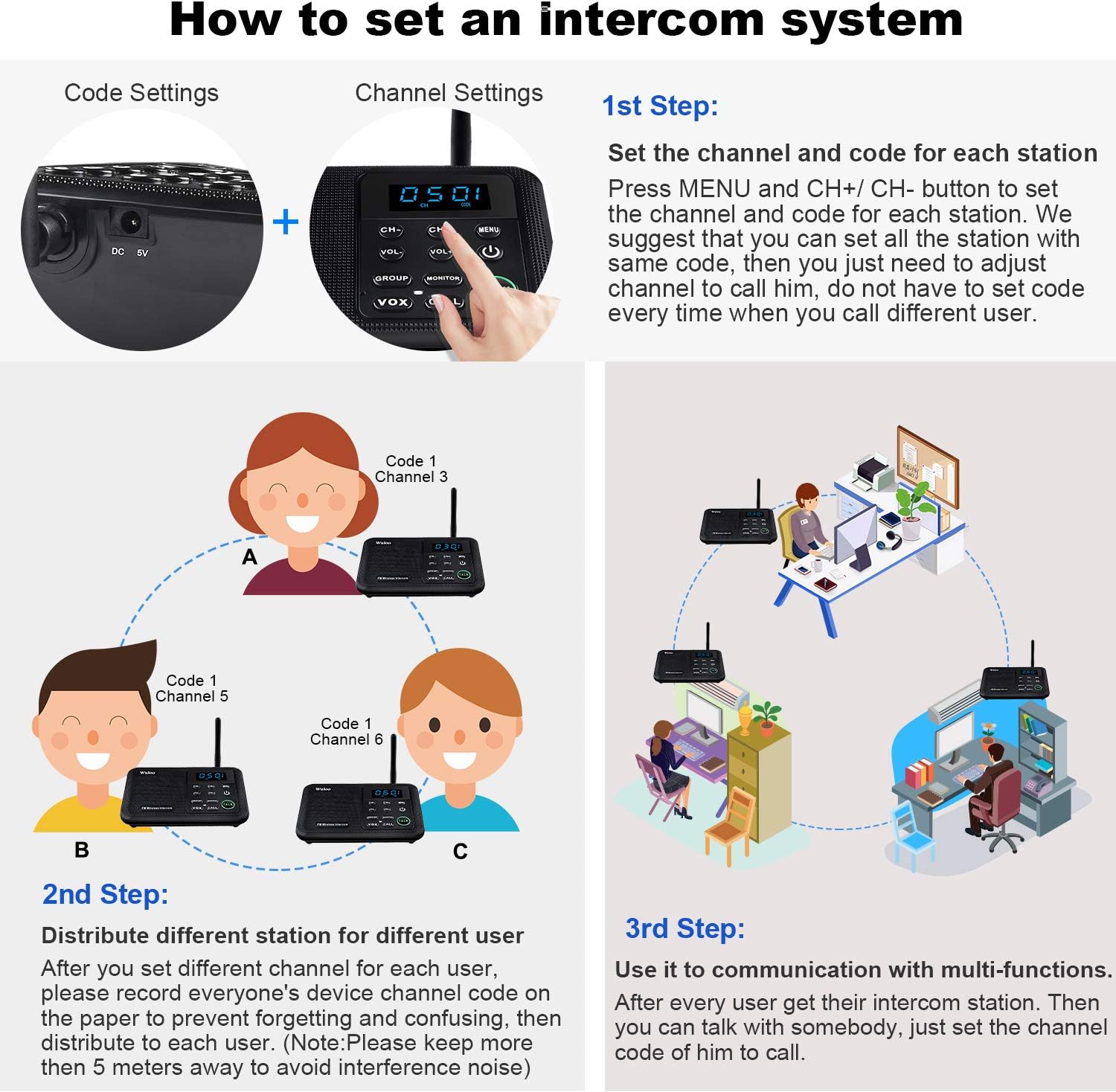
2. Please note that you will need to set the same channel and code if you want 2 intercom stations to receive communication. It also means any other intercoms can also communicate if they have same channel code. For example, your neighbors may be able to interfere with your intercom system. We suggest setting another channel or code to avoid interference.
3. A tip for setting your home intercom system
For example, let’s say you have a 4 station intercom system for your home for different rooms. You can set all 4 stations with the same code number 10(code 1-100 are choices), then you set different channels for all 4 stations. In this case, you can just set a channel number to call others without set code because your codes are all the same. If your system receives interference, you can change it to another code for all of your stations without changing every station’s channel making this a very convenient option.
4. We sincerely suggest that you can read User Manual before you use our intercom system.
Warm Tip:
Our company is a professional company for FM wireless products. All of our products have passed FCC certification, the FCC ID for this product is 2AQQS-888, you can use it without any worries.
[ Excellent Signal ] Clear sound quality and long range. An enhanced signal with 5280 feet range helps ensure crisp sound quality. The most trusted wireless intercom system for home!
[ 22 Channel and 100 Digital Code] 22 channels and 100 digital codes in a secure wireless intercom system. Features an enhanced anti-interference and can work with other intercoms with the same digital channel code!
[ Wuloo Brand ] Wuloo are specialized in FM / ASK /FSK wireless techology for more than 20 years. Package equiped with quick start guide and detailed manual.
[ Easy to Use with Detailed Manual ] Features include Monitor, Talk, VOX (Voice Operated Exchange), Group, and Calling function. Increase/lower volume, power switch, display screen too! This intercom system is easier to use than others with user-friendly multi-functions and included step-by-step instructions!
[ Supported by Power Bank for Outdoor ] This device is compatible with Power Bank (5V 1A) making it easy to take these intercoms any place you want.
10 reviews for Wuloo Intercoms Wireless for Home 1 Mile Range 22 Channel 100 Digital Code Display Screen, Wireless Intercom System for Home House Business Office, Room to Room Intercom Communication (6 Packs, Black)
Add a review

$179.99
Rick –
Quality units
I bought a set of four of these units and am currently only using two. They work well and the sound is clear,as long as you talk in a normal tone of voice. For some reason people seem to think they have to talk louder to be heard. This is incorrect and makes the voice more distorted the louder you talk. I had one problem with one unit where the talk button was stuck in the on position and neither unit would work until the button was released. I think this was user error in not pressing button down in the center causing it to get stuck on. It has never happened since. I contacted customer service about the problem and they email you back within a day. There solutions were of little help and I ended up solving it myself. They tried to help but maybe I didn’t explain the problem correctly. Based on my use of these units I would recommend them.
wls –
VERSTILE AND EASY TI USE
THEY ARE DESIGNED WELL AND VERY EASY TO USE. SOUND QUALITY COULD BE BETTER BUT GOOD VALUE FOR THE MONEY. MY ORDER OF 6 WERE OBVIOUSLY USED BECAUSE SCREEN PROTECTORS WERENOT ON THEM BUT THE ORDER OF THREE WERE INDEED NEW. AM KEEPING THE SIX ONLY BECAUSE OF THE MANY GOOD REPORTS OF THE MFGR RESPONSE TO CONSUMER PROBLEMS. STAR RATING FOR SOUND PROBLEM IS PROBABLY DUE TO SPEAKER SIZE.
Amazon Customer –
Crystal Clear Sound! No Static!
As retired Marines, my husband and I bought our dream home. Because we are still young, we didn’t expect to have problems with aching joints. Because our home is so big I thought we could benefit from an intercom system. This system was easy to set up and easy to use. It is very convenient and clear. My only suggestions is that it would be nice if the system used a rechargeable battery so that I could unplug it from the wall and have it sitting by me instead of having to go to it. Additionally, I wish changing the channel to speak to my kids individually were easier (turn dial or a one button push system). However, the makers of this system did include a group button, that allows you to speak to the other 3 systems all at once. I would definitely purchase this system again and recommend to all.
D. D. –
Fast Customer Service – Good Product
Quick delivery. One unit of the four had an issue in which the channel kept changing back to 01 01 after about a minute, no matter which channel I programmed in. After contacting customer service I learned that this is actually a feature to allow you to temporarily change the channel and then after one minute of no use the unit switches back to the primary channel without you having to do it manually. It is a good feature and is turned on or off by pressing and holding the “Menu” button for 3 seconds, once you have programmed in your primary channel of your liking. The units are light weight, small footprint and have great range. I use them with my Family Radios Service radios when the grandchildren come to visit. The children are given a walkie-talkie FRS radio when they go out to play in the neighborhood and we can talk to them on the Wuloo intercom because they are compatible. You really can’t go wrong buying these intercoms.
Eric Flich Redham –
Clunky Walkie-Talkie
So, these Wulloo WL888 are essentially walkie-talkies. They are push-to-talk, not full duplex like a cell phone. That’s ok. I wasn’t intending to have long conversations using them. We have a multi room outbuilding. I don’t always carry my cell phone and my wife doesn’t like to spend ten minutes hunting me down just to ask a short question. The Wuloo multi station intercom system seemed like a solution. I thought I’d give them a try.The setup up is basically setting each unit’s Channel and Code numbers. You push the Menu button. The Channel number starts flashing. You push the CH buttons as many times as needed to set a different channel on each unit. Pushing the Menu button again lets (requires) you set a Code number. I’m very unclear how to make use of the Code number, but it’s there and most people will just use Code 1. Pushing the Menu button a third time sets the Channel/Code for the unit.I made no effort test the range of the intercoms, but I get a good strong signal over the 50 yards or so between our two buildings. The intercoms have a call-all-stations feature, the Group function. Push the Group button and the sender can be heard on all other units (at least units with the same Code). That’s probably how we will use the intercoms most of the time, ie my will using her unit to find me.My middling rating results from the mind boggling clunky procedure you must use to call a single station. To call a specific station you must essentially follow the same procedure you followed to set the station’s Channel and Code, but you as setting the destinations Channel/Code this time. For example, to call Channel 10, you would have to make 13 button pushes. The instructions are very vague about this. It took me a while to accomplish a single until call just because I couldn’t believe anybody would design such a dumb interface. There are two button to set a channel. Why couldn’t I just push the up or down Channel button to the right channel and push Talk?Knowing what I do now, for an situation where you need less than ten units, I would probably go with the Wuloo WL666 instead of the WL888’s. They have a simpler, faster to use interface, have many of the same features as the 888’s, and are less expensive. Or you couldn’t just remember to carry your cell.
DEBBIE –
Perfect for our new home, we have them in the shops and on the third floor, works as expected, easy to set up and can turn the volume up or down. Grandkids love to you it, just speak slow and clear! Works great.
Me_Only –
completely satisfied, amazing product
Abdulla Helal Al Dahmani –
Good product as described with good range and clear voice. Easy to setup and use.
Deb –
Good workmanship. Reception is clear but volume varies with distance from transmitting unit.
Amazon Customer –
The product is reasonable but not up to the standard in coverage. It is not even covering my villa.The other issue is the plug, it is all USB without appropriate plug for the country ship to.