
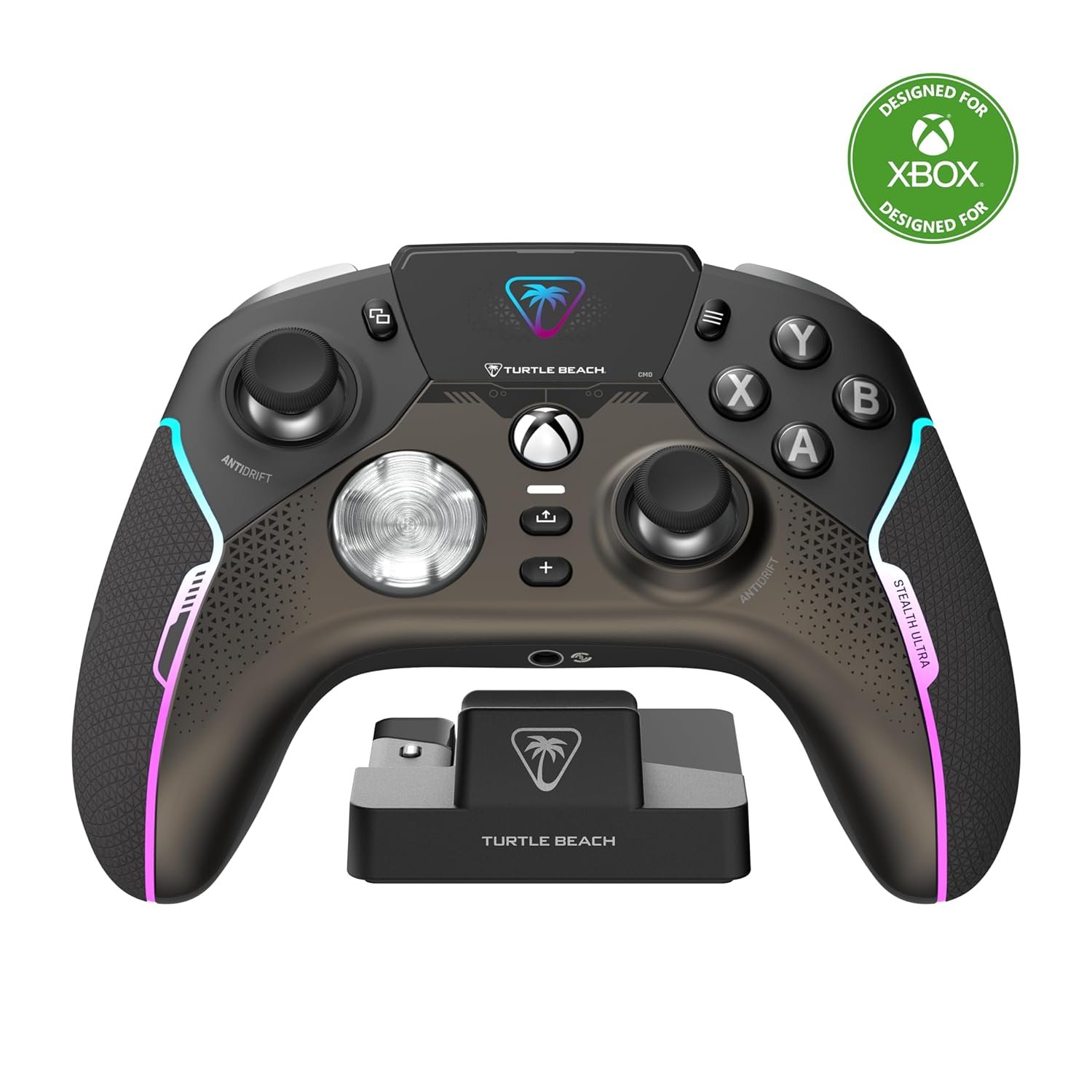
Turtle Beach Stealth Ultra High-Performance Wireless Gaming Controller Licensed for Xbox Series X|S, Xbox One, Windows PC, Android – LED Dashboard, Dock, RGB Lighting, 30-Hr Battery, Bluetooth, Black
$193.08
Related Products




Lag-Free Wireless & Bluetooth
The Turtle Beach Stealth Ultra wireless smart game controller with charge dock delivers premium performance through the best possible components and customization options for gamers who demand the best. Lag-free wireless connection lets you reliably connect to Xbox Series X|S & Xbox One consoles, Windows 10 & 11 PCs and built-in Bluetooth connectivity gives you even more flexibility for direct connection to PC, Mobiles Devices & Smart TVs with Bluetooth.
Advanced Customization
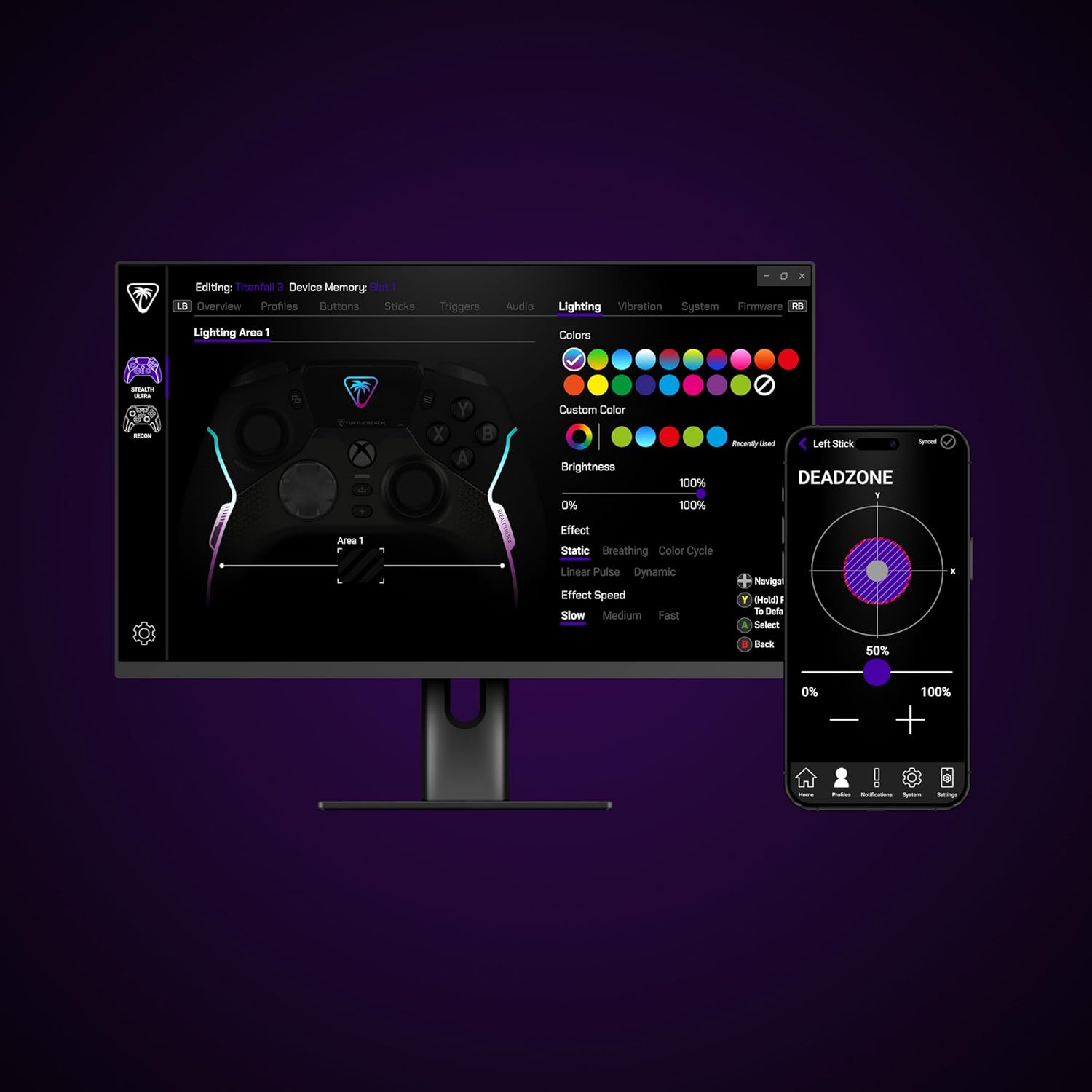
The innovative full-color Connected Command Display dashboard keeps you connected while you’re gaming and offers extensive settings adjustments accessible right on the dashboard. A patented feature, only available on Stealth Ultra, you can receive social media notifications from your phone directly on the Command Display That means no more glancing away from the game to pick up your phone to check notifications, Stealth Ultra keeps them all front and center so you don’t miss a moment of action. Also available in the Command Display dashboard, you can access on-the-fly adjustment for 10 on-board profiles for different game genres or character loadouts. Additionally, you can adjust key controller performance aspects, like button mapping, thumbstick response, dead zones, and vibration intensity. Make the Stealth Ultra your own, with 16.8 million different RGB colors, so you can set your preference for aesthetics, notifications, and low battery warnings. And for added convenience, these features and more are all adjustable in the Control Center 2 companion app for Xbox, Windows PC, Android & iOS devices.
Faster, More Reliable Controls
Designed for longevity and reliable performance, the Stealth Ultra features premium materials throughout. Tactile microswitches rated at a 5 million click life cycle are used in the D-Pad, ABXY cluster, mappable buttons, and bumper buttons for reliable, faster response with every click. The AntiDrift thumbsticks use non-contact hall effect sensors to enhance accuracy and improve durability, and two additional sets of thumbcaps are included for added customization & tactile preference. The trigger stops are adjustable for short hair triggers in action or FPS games, to full travel distance for fine adjustment of throttle and brake in racing games. Plus, four mappable quick-action buttons let you configure your exact control preferences depending on the types of games you play.
Long-Lasting Battery & Quick Recharging
The low-profile charge dock gives your controller a convenient place to rest and charge when it’s not in use. Select between Full, Balanced & Eco power modes, plus a custom mode to toggle certain features or aesthetics on/off based on your preferences. To maximum battery life, select Eco mode, turn off vibration and without a connected headset you can play up to 30 hours. If you’re looking for a full-featured experience with audio features, or if you play in short sessions, switch over to full power mode for up to 7 hours of battery life. Plus, with high-speed charging over USB 3.0, you can get back to 100% charge in under 2 hours. The dock also has a built-in USB port so you can plug the wireless transmitter into the dock and only take up one USB port on your Xbox or PC. Designed for wireless use on Xbox consoles, Windows 10 & 11 PCs, and Smart TVs, the Stealth Ultra also comes with a 10ft / 3m USB cable so you have the option to play-and-charge.
High-Performance, Lag-Free Wireless Technology
Our proprietary, lag-free 2.4 GHz wireless connection and built-in Bluetooth technology gives you the freedom to play without a wired connection.
30-Hour Battery Life & Rapid Charge Dock
Play for up to 30-hours with three adjustable power modes & settings, and recharge in just two hours using the low-profile charge dock.
Connected Command Display
Our full-color Connected Command Display dashboard keeps you connected while you’re gaming with social media notifications, and settings adjustments available right on the dashboard.
Patented, On-Board Social Notifications
Receive social notifications from your phone for all your favorite social media platforms on the Command Display dashboard to keep you in the loop while gaming.
AntiDrift Thumbsticks
Contactless, hall effect thumbsticks use internal magnets instead of full contact analog-style sticks to provide high-resolution, smooth control without drift. Plus, two sets of additional Thumbcaps are included for tactile preference.
Precise, Microswitch Buttons
Short travel tactile microswitches, rated at 5 million clicks are used for the D-Pad, ABXY cluster, mappable buttons and bumper buttons for faster, more reliable response and longer life.
Adjustable Trigger Stops
Modify the throw distance of the triggers on-the-fly to suit the games you play. Shorter hair trigger locks provide a faster return profile for FPS games or set to full travel for precise throttle and brake control when racing.
Four Mappable Quick-Action Buttons
Four mappable microswitch buttons on the back of the controller allow you to set up the Stealth Ultra to your exact preferences depending on the types of games you play.
Pro-Aim Focus Mode
Selectable as one of the preset profiles for any of the four mappable buttons, Pro-Aim tunes thumbstick sensitivity for enhanced long-range accuracy.
Customization with Control Center 2 Companion App
Open the Control Center 2 app on your Xbox console, PC, iOS, or Android smartphone to adjust controller settings and make product updates.
Advanced Audio Tuning
Enhance any 3.5mm connected headset with exclusive audio features from Turtle Beach including EQ presets & Superhuman Hearing, game & chat volume mix, and more.
Intelligent RGB Lighting
The intelligent RGB LED lighting system allows you to personalize your controller with 16.8 million distinct colors for aesthetics, notification alerts and low battery warnings.
Immersive Vibration Feedback
Dual rumble motors in the handles and triggers provide immersive vibration feedback and are fully adjustable via the Command Display dashboard.
Premium Materials
Designed for longevity and comfort, the Stealth Ultra has soft touch finishes, long-lasting microswitches, and comfortable, ergonomic grips.
Charge-Through Case
Stow away your controller, charge dock, cables and two sets of additional thumbcaps in the hardshell travel case, plus a built-in slot lets you charge your Stealth Ultra while in its case.
Keep your controller and wireless transmitter updated with the latest firmware, available in the Control Center 2 app for Xbox and PC
Patented, On-Board Social Media Notifications
Hall-Effect Thumbsticks for Long-Lasting, Smooth Control
Tactile Microswitch Buttons for Faster, More Reliable Response
Adjustable Trigger Stops
Four Mappable Quick-Action Buttons plus Pro-Aim Focus Mode
Bluetooth Connectivity with Companion App
Advanced Audio Tuning with Superhuman Hearing
Intelligent RGB Lighting System
Durable, Hard-Shell Case with Charge-Through Capability
9 reviews for Turtle Beach Stealth Ultra High-Performance Wireless Gaming Controller Licensed for Xbox Series X|S, Xbox One, Windows PC, Android – LED Dashboard, Dock, RGB Lighting, 30-Hr Battery, Bluetooth, Black
Add a review

$193.08
Level 65 tummystick –
Very nice controller.
So far so good. I have no complaints. It feels great. Love the crisp buttons. No grinding sticks, no button issues, no broken triggers. Had it for almost a year. It has turned off a couple times. But so has my elite 2 and my vader 4. Charger works great. Battery isnt the greatest but ive never had a issue. Priced high yes. I got it on sale. But i have no complaints. And i play more then the average guy.
Jesse –
Squeaky D-Pad, Random Disconnects, Terrible Customer Support
Turtle Beach once was a brand I respected and trusted to make good quality products. I had a headset that lasted years without need of upgrade (until a new console made it “obsolete”)…And then, I got this controller. First and foremost the software on the controller is tedious to use (oh but we got that amazing LCD screen!!), and some options aren’t even possible on the controller leaving you to have to use the app on your PC or Xbox (such as disabling lighting entirely). The app on console is annoying to use, despite it being designed for a controller it seems like it was made with a mouse in mind.Moving on from the bad software, let’s talk hardware (and maybe a little more software). Within 2 months of owning the controller (yay! out of refund eligibility!!) I started experiencing random disconnects. The controller would just decide it’s no longer connected to my system anymore. Worst of all, it would stay powered on acting like it WAS connected, leaving me to hold the power button on the controller until it forcibly shut off, then I could turn it on to reconnect. There was no firmware to update to as my controller was on the latest (at the time of writing). I contacted support, who gave me the super unhelpful option of “reset the controller” and “plug the dongle directly into the xbox (instead of the charging pad”, neither of which solved the issue. So they, of course, gave me a replacement for a defective controller. Not even 2 weeks into owning the supposedly new controller, the SAME ISSUE happened. I requested a refund from Turtle Beach, and all they are willing to do is to send yet another controller (so I can have the exact same problem happen, again).In addition to the controller randomly just disconnecting (it’s really fun when you’re playing an online pvp game!), the D-Pad makes a super irritating squeak sound when pressing the left side of it, even if not fully pressing the button in. Some fiddling with the D-Pad can make it quieter, but that just means parts are loose that shouldn’t be.And then there’s the other fun little issue where the controller just… does whatever it wants? That’s really my best explanation. My fingers won’t be near the guide button at all and all of a sudden I’m 3 menus into the guide.Oh.. And the real kicker? The “anti-stick” drift? The whole reason I got this controller in the first place? Yeah, worthless. Randomly my controller will just decide “Okay, you wanted to look to the left and upwards” even though I’ll be hitting the joystick down, for example.
Mallo –
It was great…
Bought this controller for my husband and at first he loved it. He noted an occasional delay in response when playing games but was overall satisfied. My feeling of triumph for selecting a controller he liked with no personal experience or knowledge about gaming, much less the controllers, quickly plummeted. About 2 weeks after getting and using this controller he started noticing stick drag, at first it was just once in a while and then it started happening almost every game. As if that wasn’t bad enough, it would disconnect from his Xbox mid game. Again, it went from the occasional disconnection we thought was just a glitch to multiple times a day.Also no, the issues were not a result of “gamers rage” (if you know, you know), he had taken great care of it since it arrived.(Giving 5 star review in hopes this review stays at the top for more people to know before buying)
Mikel G. Leighton –
EDITED: Do Not Recommend. Long term problems nullify the good features
Final Edit: One year after purchase. The down button on the D-pad double clicks every time I use it, which messes up several things in game like using a potion twice or scrolling past menu items. My P4 back paddle button now won’t pop back up after pressing it, rendering it unreliable. The controller disconnects randomly some days, regardless of being up to date on firmware and wired most of the time. I take good care of my controllers, especially something this expensive. Originally, I loved this controller and the hall effect sticks were the big draw because my other brand pro controller had stick drift issues 2 years in. Unfortunately, the buttons on this Turtle Beach controller are buggy and failing long before the sticks failed on the other brand. And I’m outside the warranty now so I have to eat this on my own. DO NOT RECOMMENDEDIT: Now that I’ve owned this for a few months I have found some flaws I want to note as my original review was based on the first few weeks. One challenge is that I’m finding the controller does crash occasionally. As it has restarting it takes time between the boot up sequence and connectivity seeking this can lead to losing competitive matches. Also, it seems that sometimes the controller glitches and doesn’t respond to input immediately or holds the last command too long. I found my character would keep walking in a direction for a second or two after I already stopped using the stick.I still think it’s a great controller and I’m hoping a firmware update is going to help fix those issues. But I’m the last few weeks I’ve run into some issues that got me killed in games more than once.ORIGINAL REVIEW: I’m writing this on a comparative basis as it is understandably hard to drop so much money on a high-performance controller without understanding what makes it better than its peers. Aside from owning standard Xbox controllers I also have an Xbox Elite, Xbox Elite 2, and a Scuf Instinct Pro controller. By far, this is my favorite of the high-performance controllers! Recently I decided I had to either get a new Scuf or find something similar because the stick drift had gotten so bad on my Scuf after 2 years. You can only wander off a tight edge accidentally so many times before you decide to retire your big investment! I decided to risk it on this new Stealth controller because of the hall effect sticks which will avoid the drift issue altogether.BACK BUTTONS & TRIGGERS: Of those controllers I own, I would say this feels more like a Scuf controller in design due to the back button placement. The buttons on the back depress like a mouse click so it has a very instant response feeling to it. The trigger pull switches work much the same way. I find they are useful in scenarios where I don’t want to full draw the trigger for an action that isn’t dependent on proportional input. Shooting a gun? That’s your feature to use!DESIGN & FEEL: The controller is slightly more flared outward on the back than a standard Xbox controller. For me that is perfect because I have big hands and it feels less crunched in. It will fit an average person’s hands fine, it just felt a little more “roomy” for me and that was appreciated. Where my fingers are bigger I found myself appreciating the large back buttons that function more like a push/pull motion. The Elite series’ paddles are tiny and my fingers would push both simultaneously, or I couldn’t differentiate between the paddles easily in the heat of an intense moment and would hit the wrong one. However, the Turtle Beach Stealth avoids this entirely with those clearly defined and separate buttons on the back. The sticks feel fantastic and smooth. The rubber grips they provide are actually good quality and make me feel like my investment is protected, too. I notice that my other controllers’ stick heads do eventually degrade from constant use. The Elite allows me to wholesale swap them out while the Scuf doesn’t. And 3rd party stick covers are hit or miss. But these delivered ones feel high quality and do the job just right. As well, the D-Pad is contoured in a way that feels intuitive and the material is decent quality. The buttons all work just fine, too. I wouldn’t say they have any ups or downs compared to their peers.The only downside I have found is that the double square and menu buttons have to sit so far off from where they normally sit on an Xbox controller. It isn’t a big issue, but I have years of muscle memory to retrain so I’m not pushing on the screen every time I try to pull up the map or menu.SCREEN & LEDs: Speaking of the screen, I would say that this feature is amazing! And if you are like me, this was both intriguing and also the big unknown variable unique to this controller.I love being able to quickly look at what my button mappings are right on the screen. You can adjust virtually everything by toggling into the system mode with the + button at the bottom of the controller (under the media capture button) and navigating the menu right on your controller. You can update your profile presets and controller light options right there. You can also adjust input curves and vibration levels. The customization is off the charts and you can store up to 10 profiles on your controller itself. You can also build up profiles with custom names and send them to your controller via your Xbox or phone app. I think you could have more than 10 profiles set up on your Xbox and just send the top 10 you need to your controller, but it beats the 3 basic profile options I had on my Scuf and the labor of managing your device profiles for the Elite series. Accessible is an understatement!A cool extra feature is you can use an app on your phone to allow messages to be sent directly to your controller. It’s neat, but I wouldn’t say it is essential. Every time you turn on your controller you have to remember to turn on the app on your phone to allow communication via Bluetooth. Reading on the controller is fun but it isn’t super clean. Good for letting you know what your buddy sent you in response to your “Getting on, u joining?” message, but the value is limited given the hassle to sync it every time.The LED lights are stylish and you can adjust the pattern, color, and brightness pretty well. I found some patterns were distracting and damn near seizure inducing. For example, “Breathe” mode wasn’t a steady ramped up glow to the color of choice then fade as I expected, but was instead more like a frenetic flashing that made me think my controller was having a panic attack! And “Responsive” (I think that’s what it was called) didn’t seem to be responding to anything that I could tell, but maybe I just need to read the directions further. To each their own, I wound up using whichever mode it was that makes it look like the color runs from top to bottom and cycles back.FINAL THOUGHTS: I highly recommend this controller if you are in the market for a high-performance pro Xbox controller! Be prepared to get used to a different feeling when holding the controller due to the contour differences. For me it is a positive change at least.
paolo –
Un capolavoro assoluto!!!! Soldi ben spesi!!! Confortevole leggero e una risposta immediata!!! Facilissimo il menù!!! Un pad ben fatto!!!
Tifany –
J’ai récemment acquis la manette Turtle Beach Stealth Ultra, et je suis vraiment impressionné par ses performances et ses fonctionnalités.Points positifs :Confort de prise en main : La manette est ergonomique et agréable à utiliser, même lors de longues sessions de jeu. Les poignées antidérapantes offrent une bonne adhérence, ce qui est très appréciable.Réactivité des boutons : Les boutons sont très réactifs et bien positionnés. Les gâchettes et les bumpers offrent une réponse rapide, ce qui est idéal pour les jeux d’action et de tir.Connectivité sans fil : La connexion sans fil est stable et sans latence, ce qui permet une expérience de jeu fluide. La portée est également impressionnante.Station de charge rapide : La station de charge est très pratique et permet de recharger la manette rapidement. Cela évite d’avoir à chercher des câbles et rend le rangement plus facile.Personnalisation : La possibilité de personnaliser certains boutons et de modifier les paramètres de la manette est un excellent ajout pour les joueurs qui souhaitent adapter leur expérience.Points négatifs :Poids : Certains utilisateurs pourraient trouver la manette légèrement plus lourde que d’autres modèles, mais cela dépend vraiment des préférences personnelles.Autonomie de la batterie : Bien que l’autonomie soit raisonnable, il peut être nécessaire de la recharger fréquemment si vous jouez intensivement.En résumé, la manette Turtle Beach Stealth Ultra sans fil est un excellent choix pour les gamers qui recherchent confort, réactivité et praticité. La station de charge rapide est un vrai plus, et je recommande cette manette à tous ceux qui veulent améliorer leur expérience de jeu !
Primekunde82 –
Zu dem was der Controller alles kann muss ich nichts schreiben.Ich möchte auf die Mängel aus den anderen Rezensionen wie quietschende Buttons und lauter Force Feedback Motor eingehen.Aufgrund der anderen Rezensionen und der Tatsache das Amazon selbst den Artikel als häufig zurück gesandt markiert war ich skeptisch. Doch da mein andere Wunsch Controller nicht lieferbar war habe ich es gewagt.Der Ersteindruck ist Super und der Controller sowie Zubehör wirken wertig. Das Display finde ich auch mehr als ein Gimmick erlaubt es mir doch ohne Zusatzsoftware schnelle Einstellungen vorzunehmen wir z.B. das Durschalten vorher angelegter Profile ändern der Beleuchtung etc. Wird von mir regelmäßig genutzt.Das zocken an sich fühlt sich auch sehr gut an und von der Haptik gefällt er mir aufgrund meiner großen Hände auch sehr gut und sogar besser als das Original.Direkt zu beginn fiel mir allerdings der recht laute FF Motor auf und auch die Art des Geräusches fand ich im vergleich zudem was ich gewohnt war etwas unangenehm.Nach kurzer Zeit fingen dann tatsächlich auch einige Buttons an zu quietschen. (Bei mir der A und X Button) was mich doch sehr ärgerte.Ich habe mich an dem Punkt dazu entschieden den Controller nicht direkt wieder einzupacken sondern noch ein paar Tage zu testen trotz der Mängel.Auch weil ich vom Rest doch sehr angetan war (abgesehen vom Steuerkreuz, das ist ok aber nichts tolles) Da ich aber eher selten nutze um wirklich zu zocken ein Punkt mit dem ich gut leben kann. Die Zusatzbuttons hab ich bis heute nicht einmal versehentlich ausgelöst nutze aber auch nur 2 davon regelmäßig.Nach einigen Tagen und täglichem Einsatz besserte sich das anfängliche nervige Geräusch des Motors und war deutlich ruhiger und auch vom Gefühl her besser. Das quietschen der Buttons trat nur noch sporadisch auf und war nach ein paar weiteren Tagen komplett verschwunden.Bis heute ist der Controller täglich im Einsatz und wird für mehrstündige Gaming Sessions genutzt. Es quietscht gar nichts mehr. Woran das liegt können die Ingenieure von Turtle Beach vlt. erklären aber ich hab da keine Ahnung^^.Bin jedenfalls froh ihn behalten zu haben. Beste Controller den ich bisher hatte.
Miguel garcia –
No puedo decir que lo prefiero antes de mi series elite 2. Pero si puedo decir que es muy cómodo y pesa muy poco. Está bastante bien. Ya depende del uso que le quieras dar.
Sean –
Best controller I’ve had so far