

Penstar eNote Pro 10.3″ Color E Ink Paper Tablet Bundle, Touchscreen Digital Notebook, 4GB 128GB ePaper Writing Tablet with B6 Stylus Pen, AI Powered Voice-to-Text
$479.00
Related Products




Product description


1 Write Naturally 2 See Ideas in Color 3 Light Feels Right 4 Scan and Organize 5 For Workflow


How to install third-party Android applications?
The More Apps store lets you download commonly used E-Ink apps. To install other third-party apps, sideload by copying the .apk to internal storage and tapping Install. You can get .apk files from app markets or contact Penstar support team.
Can I sync notes between my Penstar eNote Pro and my phone, tablet, or laptop?
Yes, all content is synced via the Penstar Cloud service. Download the Penstar App for iOS, Android, iPadOS, Windows, or macOS (M1/M2 chip or later) to access and sync your notes anywhere, anytime.
What types of files does Penstar eNote Pro support?
Penstar eNote Pro supports over 35 file formats, including common docs like PDF, EPUB, MOBI, AZW, AZW3, TXT, DOC, DOCX, RTF, PPT, PPTX, XLS, XLSX, HTXT, HTML; images like JPG, PNG, BMP, GIF, PIC, JPEG, ZIP Comics; and audio files like AMR and MP3.
Is split screen available on Penstar eNote Pro?
Yes, you can easily split the screen, allowing you to take handwritten notes while simultaneously reading ebooks. You can capture key points or analyze information directly alongside your reading material.
THE REAL PAPER-FEEL COLOR E INK PAPER TABLET – Experience the next-gen of ePaper with the Penstar eNote Pro, featuring an impressive 10.3” Kaleido 3 color display that looks and feels just like real paper. Enjoy natural pen-on-paper writing, sketching, and read comfortably with adjustable front light and zero glare — bringing your ideas to life, naturally. Penstar’s first finger-touch color e-ink tablet.
SMARTER HANDWRITING, POWERFUL NOTE CONVERSION: Powered by MyScript industry-leading technology, your handwritten notes are instantly convertible into editable text. Organize and search your ideas efficiently—perfect for professionals, academics, and creative thinkers.
AI POWERED REAL-TIME VOICE TO TEXT – Effortlessly convert speech into text in real time with support for over 52 languages. Automatically generate structured meeting summaries using built-in AI tools, making it the perfect digital notebook for business meetings, academic conferences, and brainstorming sessions.
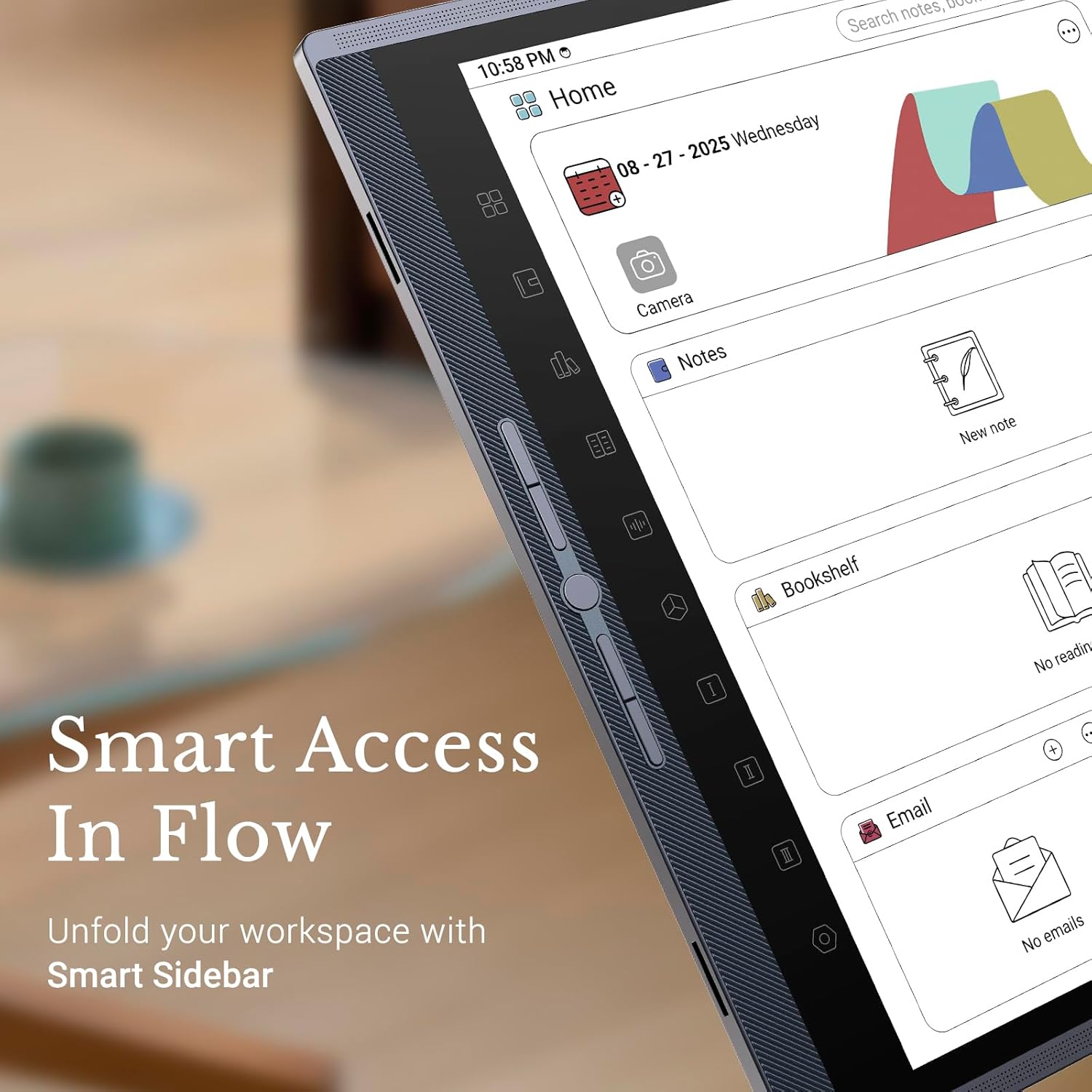
PEN-ONLY SMART SIDE BAR – Experience effortless control with our pen-exclusive side menu. Designed for precision stylus interaction, it lets you switch apps and access shortcuts with a simple pen tap — no accidental finger touches. Boost your productivity and focus on what matters most.
CUSTOM BUTTON CONTROLS FOR ULTRA-FAST WORKFLOW – Take control of your productivity with 5 physical fully customizable shortcut buttons. Instantly launch your favorite tools, switch between writing and reading applications, or trigger key functions with a single tap. Eliminate endless menu navigation and stay focused on your ideas, not your screen.
CLOUD CONNECTED & ALWAYS IN SYNC – Effortlessly access your notes anytime, anywhere. Seamlessly sync files through Google Drive, OneDrive, or Dropbox, or share your work instantly via email or PDF export. Stay connected across devices with the Penstar App on your phone, laptop, or iPad. Your ideas are always right where you need them, whether you’re at home, in the office, or on the go.
WHAT’S IN THE BOX – Your Penstar eNote Pro color e-ink tablet bundle comes with a high-precision and premium aluminum-alloy Digital Stylus B6, an extra 10 nibs spare kit, a magnetic folio cover, a USB-A to USB-C cable, and a quick start guide. Everything you need to start writing right out of the box.
6 reviews for Penstar eNote Pro 10.3″ Color E Ink Paper Tablet Bundle, Touchscreen Digital Notebook, 4GB 128GB ePaper Writing Tablet with B6 Stylus Pen, AI Powered Voice-to-Text
Add a review

$479.00
Wesley and Stacey Delk –
Great color e-ink tablet! Highly recommended!
I was surprised when the eNote Pro was announced because it has a Kaleido 3 color screen, touch support, and frontlight. This marks a departure from Penstar’s other devices with black and white screens with pen only input and no front lighting. When I noticed it retains the physical buttons while also offering new pen-only shortcuts on the sidebar, I decided to give it a shot. TLDR; I’m extremely satisfied with my decision.The Penstar eNote Pro comes in high quality packaging offering a satisfying unboxing experience. Included in the box are:TabletStylusFolio CaseCharging cableSpare nibsDocumentationThe eNote Pro brings some fairly strong specs to the table, featureing a 10.3” Kaleido color screen with a resolution of 2480 x 1860 that features 300 ppi for B&W content and 150 ppi for color. Under the hood, there’s a 2.2 GHz Rockchip RK3576 octa-core processor, 4 GB of RAM, 128 GB of storage, running Penstar OS 2.0, based on Android 14. Powering the device is a 6500 mAh battery rated for two weeks of use. It also has a camera for scanning documents, a 4-mic array for recording audio, and stereo speakers.The eNote Pro looks and feels high end, with an aluminum alloy build that is comfortable to hold and use while never feeling flimsy. The front has a premium metallic finish with the larger left bezel featuring a brushed grille housing five physical buttons. The top and bottom bezels appear to have grilles for accommodating stereo speakers and the multi-mic array. The back of the tablet has a leatherette texture that matches the folio cover, adding a quality feel and bit of gripiness. A camera on the top left corner of the back is for scanning documents as well as taking photos and video.The edges of the eNote Pro are comparatively minimalist with the top edge of the eNote Pro houseing the USB-C port, a LED charging indicator, and the power button. The left edge has two indentations for snapping the cover onto the device. The bottom edge has a three-hole grille. The left side houses one a useful feature. The eNote takes a simpler and better route to stowing the stylus, with the pen clip slotting into the side of the tablet, making a secure physical connection between the tablet and pen which retains the pen even when shaken vigorously.The eNote Pro does not disappoint on the performance front. Things are generally snappy, especially when viewed in the context of e-ink screens, which require longer refresh times. While the eNote Pro does most things standard tablets do, it truly excels with the intended functions of reading and writing.Functioning as an e-notebook is the meat and potatoes of the e-ink experience, and the eNote Pro does not disappoint. The home screen is a standout feature, putting the most important features a click away. There are calendar and email widgets, as well as easy access to notes, bookshelf, and apps. There’s also a search bar readily accessible.Penstar’s EMR stylus is inductively powered by the screen, not requiring charging like active styli. Grab it and start writing! The pen has a metallic barrel and a plastic cone at the bottom and a plastic clip for snapping onto the tablet. It features an eraser at the top and three programmable buttons on the barrel. It feels good in my hand and provides both a dedicated eraser and programmable buttons.However, I have mixed feelings about the writing feel. It’s good, but not quite a paperlike feeling. It still has a bit of the slickness of writing on a glass screen, but there is still a subtle resistance. Thankfully, the pen is not “tappy,” so it is a quiet writing experience even for someone like me who switches between print and cursive. Perhaps using an etched screen or protector would give it a more paperlike feel, but likely at the cost of screen sharpness.The new pen-sensitive buttons are a standout feature I never knew I needed, but now can’t see myself living without because they are so useful! There are ten shortcut buttons faintly etched (perhaps a tad too faintly if you are in a darker environment) on the left bezel that react only to the pen, allowing access to the homescreen, notes, bookshelf, voice recording, settings, and three user-configurable apps or functions. Since these buttons are responsive only to the pen, they won’t inadvertently trigger when holding the eNote Pro with your left hand.The native note app is great, with all the basics covered plus some extras. There’s a choice among pencil, pen, and markers, each with various line weights and colors. You can add callouts and flourishes to your notes. Eraser options include pixel, range (lasso an area to erase it), and stroke. There is a shape tool with numerous options. The lasso tool lets you select items in your notes and move or resize them, as well as copying and pasting. A number of pre-installed note templates provides plenty of options or you can create and import custom templates. The handwriting to text conversion does a pretty good job of deciphering even my awful handwriting. One other interesting implementation is system-wide pen settings, creating configurations for a pen, a marker, and a highlighter across all apps.The native reading app handles several formats, but I tested it mainly with EPUB and PDFs. For EPUBs, you can adjust the way the book is displayed by choosing font size and family, line spacing, and layout type. Since I am visually impaired, I use large fonts and my ebooks were still rendered correctly. The physical side buttons flip pages. There’s also AI text to speech, but the voices are serviceable at best.In addition to creating a reading note embedded in the book, you can mark up the e-book directly on the pages with the same tools as the note app. This introduces features such as generating an index of annotations and being able to quickly navigate between them. There’s bookmarking pages as well an excepting feature which creates a clipboard of selected content. You can reflow the text in PDFs and choose between flipping or scrolling pages. The side buttons can flip pages or zoom in and out.Final thoughtsThe eNote Pro is fantastic The build quality is on point, looking and feeling like a high-end device should. The Kaleido 3 screen is bright and colorful because there’s not an etched screen or factory-applied screen protector. This compromises between image quality and writing feel, but it’s the right choice. As an e-notebook, it does an admirable job of providing the features needed for integrating this device into your workflow. The homescreen is understatedly awesome and makes the most used features easily accessible. The notes and reading apps provide solid features, and the upside is more can be added with updates. Add in the AI recording function helping you take and leverage notes, and it’s even better.There are a few minor and one major shortcomings with the eNote Pro. It’s lacking a few creature comforts like a fingerprint reader and SD card expandable storage that. The notes and reading apps have the basics plus more covered, but there are things like auto-shape correction missing. However, the biggest drawback is a lack of Google Play certification. Not only does this prevent obtaining apps from the Google Play Store, but it also means certain apps needing Google Play Services to operate can’t be installed they won’t function fully. This is a feature that can be added later through software updates, In the meantime, there are other app stores available offer many but not every app. If you are technically inclined, apps can be sideloaded by installing .apk files, but any that require Play Services framework won’t be compatible.The eNote Pro is a phenomenal e-ink tablet. Quality hardware, including a gorgeous Kalideo 3 screen and the most useful hardware shortcut buttons on any tablet—e-ink or otherwise—partnered with software that makes it a competent e-notebook. Getting everything you need in the box makes the eNote Pro an even more compelling option and value. I highly recommend this tablet for anyone wanting a color e-ink notebook that can do “tablety” things It is currently a superb all around device with the potential for becoming even better through software updates!
Amazon Customer –
Great product! Missing some features, but overall GREAT!
I love this tablet! Great design. Love the customization. The colors are phenomenal. Great e-ink tablet.BUT, I was a former reMarkable Paper Pro owner and here is what I would suggest for Penstar going forward:1) Folders: reMarkable allows for PDFs and notes to be placed in one folder, ideal for those with numerous different case files or classes. If Penstar had this feature as well, this would be 6 out of 5 stars I stg.2) Offline note taking: reMarkable allowed me to take notes and mark up PDFs without being connected to the wifi. Now Penstar does allow PDFs to marked up, but I have ran into issues where it won’t let me take notes without wifi connected. That was frustrating when my Hotspot took forever to connect and I couldn’t take notes when visiting a client in the jail.3) Highlighter vs Marker: reMarkable highlighter actually looks like a highlighter would in real life where the color doesn’t eat the text under it and you can still see the words. So far, unless I am doing it wrong, sometimes, depending on the PDF, the marker makes the text harder to read. Also, again unless I am wrong, I can’t highlight on the Notes only the PDFs.All of that to say, this thing is still 4 out of 5 stars. A great secondary option to reMarkable. If Penstar added these options in, they would be really competitive to reMarkable.Thanks for coming to my TedTalk!
doowron1 –
Only Android 12
Android 12 and can’t be upgraded to 15, 16 or 17 in the future
Motheroftwo –
A Strong Color E-Ink Device for Professional Daily Use
I bought this tablet to cut down on screen fatigue and stay organized during long workdays, and it’s quickly become part of my daily workflow. The color e-ink screen makes reviewing documents and presentations much easier. Highlights stand out. Charts are clearer. Visual cues finally make sense without the glare of a traditional tablet.The writing experience is smooth. The pen feels steady on the screen, and the texture gives you just enough grip. The built-in pen slot is a smart touch. It holds the pen securely, so I’m not digging for it between meetings.I use this for planning, note-taking, and marking up large PDFs. Everything loads quickly, and exporting notes is simple. It also handles eBooks and Kindle files well, which makes it easy to switch from work reading to personal reading without changing devices.Battery life is strong. I can go days without charging, even with heavy document review and daily notes.If your work involves reading, annotating, or prepping materials, this is a solid tool. The mix of color clarity and the calm of e-ink has made a real difference in how I stay focused and get things done.
Vanessa –
First, this is my first experience with this kind of device, and i am very surprise by this penstar!1: I love the fact that the pencil is quickly responsive when you takes notes. It almost feel like real paper. One thing to consider is when you takes notes on a power-point doc, the delay is approximatively 2 sec before the writting appear on the screen, so i switch to writing board and that is ok. Still not the main purpose of the penstar.2: There is a lot of option for the writing, color, style, forme ect.3: The screen light can be change as you like, witch i really like because i didn’t get tired at all and i see everything clearly anytime of the day.4: The design look professionnal, stylish and the cover is include, so you don’t have to order one.5: The rapidity of the tablet is something i was expecting from it but i don’t have any other experience.6: The camera is a grest value to it because i can take a photo and add it to my note and write beside, very useful. No, it is not android or apple quality, but its not something that bother me because this is not what i was expecting from the penstar.7: To consider, you have to subscribe to have illimited access of the voice text converter. The text converter require wifi . But, without wifi, the tablet still is almost completely fonctionnal.8: I use it almost 5-6 hours to discover the tablet the first day and the batterie had gone to 98% at 50%, it is very good because i did a lot of thing with it. It will last a lot longer if you just read or do little thing with it.9: For my first tablet, i am impress and i decide to keep it, very excited i am to use it at my job and school :)Thank !
Kyle Quinn –
I’m only giving this device 4 stars due to the inflated price for what it actually is. With that out of the way, this is the only writing tablet brand that I’d recommend. This particular device seems to be responsive and very functional for it’s intended use case. Why would I recommend this over almost every other brand even given their high price point? Offline use.The Amazon Kindle Scribe and other models require cloud connectivity. This one provides the cloud as an option, not a requirement. You can transfer files both TO the device and FROM the device via direct transfer over wifi with no cloud required. You can’t even use the Kindle Scribe without creating/logging into an Amazon account. This device requires nothing. Power it on, use it. Done. Considering how often companies these days decide to arbitrarily disable peoples devices, this was paramount in my purchase decision.In terms of performance: It does everything I’d expect it to do and far more. It’s a great device. Expensive, but worth it for those who will utilize it’s functions.