

Ingnok Portable Monitor, Ultra Slim 15.6 Inch FHD IPS Laptop Screen Extender with Adjustable Stand, USB C Compatible, Ideal for Travel and Office
$11.99
Related Products
![JSAUX FlipGo Pro 16″ Dual Portable Monitors, 2.5K Triple Laptop Screen Extender, Portable IPS Dual-Screen Monitor for Laptop[for Windows/Linux/macOS] One Cable to Dual/Magnetic Design/DisplayLink](https://everyday-tech.co/wp-content/uploads/2026/01/71iAduQ8LJL._AC_SL1500_.jpg)


Product description


Who is the ingnok monitor suitable for?  Office Worker
Easily share your screen to communicate in meetings, expand it to double your productivity in your daily work, or use it as your home screen when you shut down your computer.
 Business Traveler
Weighing just 1.44 lbs and as thin as a smartphone, makes it easy to carry, allowing you to set up an efficient workspace wherever you are, be it in a hotel, café, or airport. Ingnok Travel Monitor is ideal for traveling.
 Gamer
Gamer
Ingnok Portable Gaming Monitror with a resolution of 1920×1080 and a 1200:1 contrast ratio for clear and vivid details and realistic color reproduction. Enjoy an immersive visual experience of Gaming!!!
 Learner
With flexible angle & height adjustments to suit various scenarios. Whether on the desktop, wall-mounted for presentations, Portable Laptop Monitor helps students complete tasks efficiently while enjoying the convenience of mobility.

Helps you use Portable Monitors more easily ! USB-C plug and play
When using a full-featured TYPE-C cable to connect the monitor, the initial brightness is 50 in order to fit most laptops, and you can actively set it to 100.
Before connecting, check for a label near the Type-C port indicating video output support, such as “P” or a lightning bolt symbol.
The video showcases the product in use.The video guides you through product setup.The video compares multiple products.The video shows the product being unpacked. how to connect with usb port Merchant Video
HDMI Connection 1
Since the HDMI port only supports video output, the monitor (or your device) must be powered when connected.
The brightness adjustment will have an upper limit depending on the charging port.
For example USB C 2.0; USB C 3.0
The video showcases the product in use.The video guides you through product setup.The video compares multiple products.The video shows the product being unpacked. how to connect with HDMI port Merchant Video
HDMI Connection 2
Since the HDMI port only supports video output, the monitor (or your device) must be powered when connected. the initial brightness is 50; and you can actively set it to 100.
The video showcases the product in use.The video guides you through product setup.The video compares multiple products.The video shows the product being unpacked. how to connect with HDMI port Merchant Video
Why is the monitor flickering?
If there is a flashing screen, most of them are caused by insufficient power supply. It is recommended that you replace it with an adapter with greater than 5 watts of power and reconnect it to see if it works.
The video showcases the product in use.The video guides you through product setup.The video compares multiple products.The video shows the product being unpacked. why the monitor flickering? Merchant Video
smart phone connection
for compatibility with most smart phone; the initial brightness when the phone is connected to the monitor is 30; it is recommented that you power up the monitor so as to increase the brightness to 100; or the range you want.
The video showcases the product in use.The video guides you through product setup.The video compares multiple products.The video shows the product being unpacked. connection with smart phone Merchant Video
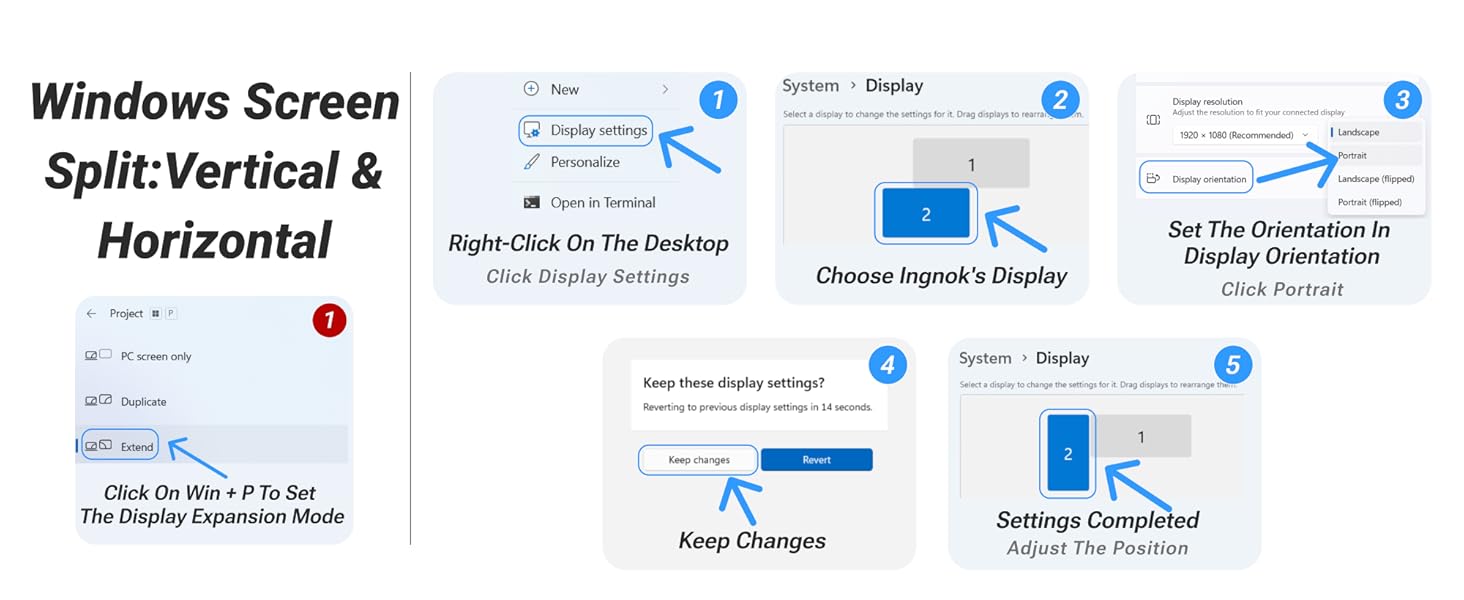
1 Wins Vertical Mode
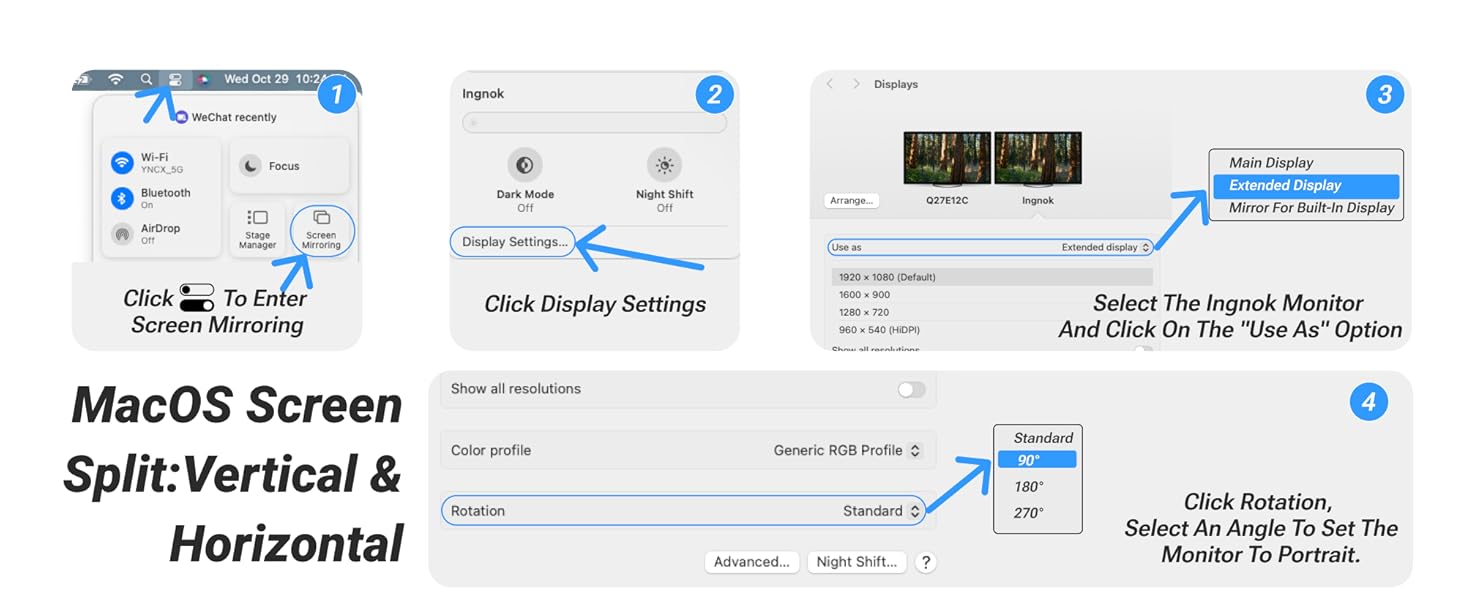
2 MacOS Vertical Mode
3 Multi-Functional Mount
[Ultra-Thin and Portable, Easy to Carry] The Ingnok Portable Monitor is only 0.5 times the thickness of an Phone and weighs just 1.44LB. It’s incredibly easy to carry whether you’re traveling or working at your desk, providing a hassle-free experience.
[FHD IPS Monitor for Visual Enjoyment] Featuring a 1920×1080 resolution, Portable Monitor for Laptop delivers clear and vivid details with true-to-life color reproduction. Enjoy an immersive visual experience that makes
[ Flexible Viewing Angles]Equipped with an adjustable stand, Ingnok Portable Screen allows you to freely adjust the viewing angle to your preference. Enjoy the most comfortable viewing experience, whether you’re working,
[Quick & Seamless Connection]Utilizing the latest USB-C technology, Ingnok Travel Monitor provides data transfer and power supply through a single cable. Compatible with various devices, including laptops, Mac,PC,and gaming
[Boost Productivity, Ideal for Flexible Work]The Ingnok Laptop Screen Extender helps you multitask efficiently, boosting your productivity. Whether where you are , is the companion for a flexible and efficient work setup.
9 reviews for Ingnok Portable Monitor, Ultra Slim 15.6 Inch FHD IPS Laptop Screen Extender with Adjustable Stand, USB C Compatible, Ideal for Travel and Office
Add a review

$11.99
Catherine Chan –
Great Monitor – Must have for students
I’ve really enjoyed using this monitor. I’m a college student, and this monitor is super convenient. It’s super lightweight and easy to carry. I bring it to campus and the library all the time, and it’s been so useful when I need multiple screens for reading articles, taking notes, or working on assignments. It’s especially helpful during Zoom meetings or online classes since I can keep the lecture on one screen and my notes on the other. Connecting the monitor to my laptop has been really easy, I just use the USB-C cable and plug it from my laptop to my computer. I also have no complaints about the quality of the monitor. The color, brightness, and image quality are pretty good. The stand that comes with the monitor is also very strong. I’ve never had any issues with the monitor fall off the stand. This monitor has become one of my most used products for school, and I definitely recommend it if you are student or travel a lot for work.
Ava A –
Perfect Travel Companion
So perfect for my remote set up while I traveled. The USB C connection for my Dell, MacBook, and Thinkpad worked very well, just plug in and it’s ready to go! It seems to be compatible with just about anything with a usb c port. The HDMI is fine too, you just need to also use the provided USB A, which is too many cables for my liking. Luckily, neither option drained my battery like I anticipated. I am really pleased with the weight, photo and color quality, and ease of this screen. All of my travel companions were very envious of such a good quality device that made working from abroad so easy and even enjoyable. Because it is roughly the size of my laptop screen, I felt very immersed as opposed to a larger one which makes the disparity too great. For the price, I could not have a single complaint. The quality makes it seem like it will last for along time too. Worth every penny.
Stormy –
Just get it already!! Perfect for work travel/ meetings/ office needs!
I sat on this one for far too long. I honestly didn’t really know portable external monitors were even a thing until the past year when I saw one at Costco. I was thinking that might actually be pretty handy for work, as I tend to deal with multiple programs simultaneously including at meetings when I’m trying to show someone something like a spreadsheet and graphs, and so on. I also thought it’d be great for when I do conference travel or on the occasions I have to work from home. My home office already has a dual monitor setup with docking station so that’s easy, however, there are times my husband also works from home and we fight over the monitor setup, so this might just save our marriage. 😉 Joking aside, I wish we had this thing during the pandemic shutdown because it would have made working from home so much easier.I’ve had this one in my cart for quite some time, and then noticed around Black Friday/ Cyber Monday, it was an extra 15 off or so, and I decided to leap. In deciding which monitor to get, there were mostly positive reviews, though some more critical. I wasn’t entirely sure what to expect, but have thus far been absolutely blown away!My favorite features:–It is quite thin and lightweight, in a nice and portable way rather than “this is a cheap piece of… ” way–The quality is phenomenal. Very crisp and clear and plenty bright without being blinding. There are settings to mess with too, though I found it perfect right out of the box–It comes with multiple connectors so should work for a variety of purposes and with different computer or other device configurations–It was pretty much plug and play straight out of the box. It turned on with 0 issues. My PC laptop always defaults second monitors to duplicate screens rather than extending screens, so I wasn’t surprised when this was the same. It was a simple, quick fix by going to my display settings and changing the monitor to extend rather than duplicate. I had to switch my monitors around in settings so this monitor would work with dragging things from my laptop monitor to the right, rather than to the left due to my preferences. It might be tricky if you’ve never done it, but it’s old hat for me. Long story short, play around with your display settings until all is configured the way you want. I find when I plug it in again, it automatically defaults to this setup unless I have changed the settings for a different monitor setup at work or home, and then I might need to reset again. I could see where a duplicate screen could actually be handy in a meeting, however, at a meeting where multiple people around a table need to see the same thing, so I could have my laptop facing one direction, and the other screen facing another. I see so many possibilities with this one, actually, for work purposes and I’m grateful to have it.–It comes with a felt carrying case which is perfect for keeping the screen scratch-free and keeping the cables and such together. The velcro doesn’t fasten if you have the stand connected, but it still all fits in the case just the same.–I’ve looked at many different portable monitors, but ultimately loved this one for coming with multiple adaptors/ cords and the adjustable monitor stand, saving me time and money. The stand is very easy to install and uninstall — just two simple screws and it’s fairly adjustable so you can line it up with your laptop screen if that’s your preference, or change the angle. It works very well for my needs, but if you have super specific needs or need to raise it up or down quite a bit, you may want to look at a different monitor stand with more adjustments. I found this one to be just right, however.My only criticism so far, but the pros far outweigh the cons!–As mentioned, the carrying case won’t fasten if you have the monitor stand attached. It’s pretty minor, but do wish the velcro had a couple different fastening settings so everything could close up with or without the stand. Yes, I could technically remove the stand easily but would prefer to have everything set up and ready to go for quick access.Long story short, run, don’t walk, and grab this monitor! Whether you need it for work purposes or for gaming capability (per many of the other reviews), this monitor is fire! I highly recommend!
Jay Ess –
Practical portable monitor for travel and office use
This portable monitor works very well for creating a compact travel or mobile office setup. The screen quality is excellent, with bright colors and sharp resolution that make it easy to work on for long periods. It does require one cable for power and another for display output, which adds a bit of weight and clutter, but the setup is still simple enough once you get used to it.I often use it in a vertical orientation with the cables running downward, and it performs great that way. The stand is adjustable and holds the monitor steady without wobbling. It is thin, lightweight enough to fit easily into a laptop sleeve or backpack, and feels durable enough for regular travel.It stores away quickly after use and takes only a moment to reconnect when needed. For remote work, business trips, or anywhere you need an extra screen on the go, it is a solid and reliable choice that adds real productivity value.
Q –
I had one a few years ago but it required a cable to connect the laptop and another for power. It was not practical, and the stand was wobbly, I barely used it.This one is fantastic, it does work very well (resolution, brightness, etc…) with only one cable connected to the laptop. The stand is also simple, smart and practical. The pouch is a good addition too.Don’t hesitate.
Leah Freitag –
Just started using the extra display today and everything appears to be functioning well. Can toggle back and forth between my laptop to extend the display there to this monitor as well as to my S22 Ultra to use the monitor as a full display. 1080p great looking picture.Two complaints: the speakers are very quiet even at maximum volume, so I wouldn’t use those. You can use headphones, but again, it isn’t very loud at all. I would just use your laptop speakers, your cell phone speakers or even to Bluetooth connect to a different set of speakers from your phone. The stand is alright, just doesn’t raise it high enough off the desk for me, but it does work very well if you don’t mind having it that low. It’s just too low to have at the same height as my laptop screen as it is on a stand. Other than those two things, the monitor is great and I would recommend it for it’s price just knowing the sound limitations (which realistically, most wouldn’t be looking at a monitor for it’s sound quality, so that’s why I still give it 5 stars.)
rossintx –
I’m old enough to remember when China had a reputation for mass-producing shoddy stuff. Those days are long gone. The quality of the goods manufactured in China is extraordinary.This monitor is a good example. It weighs 1.4 pounds, is a quarter of an inch thick, and comes with a stand and a travel envelope and two connection cables, and it is big enough to be a second monitor for my iMac and my MacBook Air. To install, just plug it into a powered USB-C port. No other cords necessary. No setup required, beyond telling my computer I have two display screens.I do a lot of work writing and reviewing documents, and a second screen is a great convenience. I found working from the small screen of a MacBook Air to be difficult, but now I’ll travel with both the laptop and this monitor.When I’m in my office, I connect it to my iMac, and I’m in business.All that convenience and flexibility for $190. I’m delighted.
Neville Ng –
Excellent quality, easy to carry and set up. Excellent value for money.
Leandro Souza –
Very impressed with the quality of the product. The image resolution is very clear, plug&play so absolutely easy to use.Recommend to anyone looking to a travel second monitor.