

Amazon Fire TV Stick, sharp picture quality, fast streaming, free & live TV, Alexa Voice Remote with TV controls
$39.99
Related Products



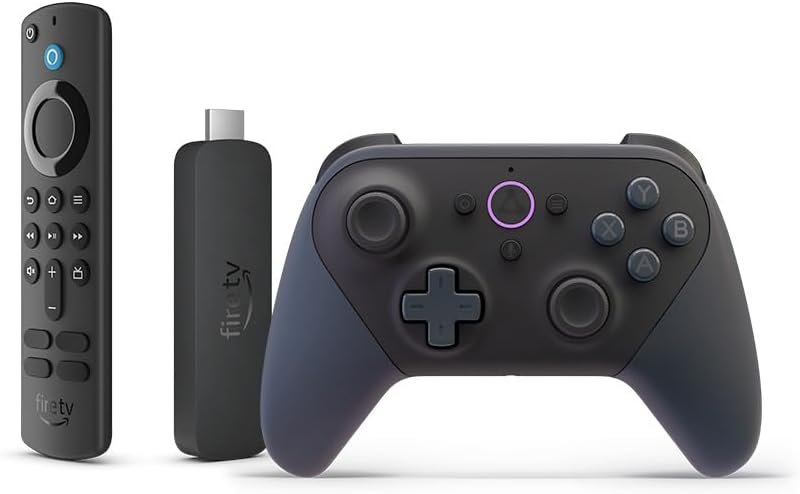
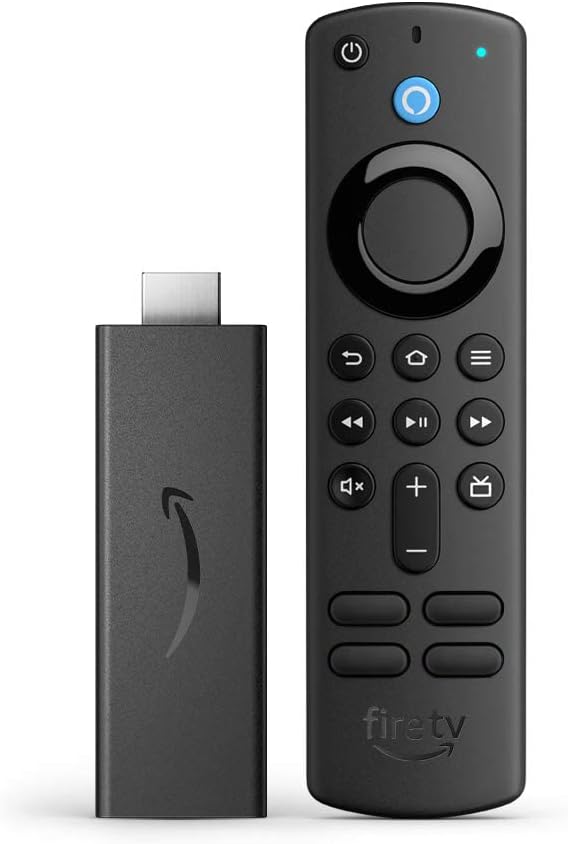


50% more powerful than the previous generation for fast streaming in Full HD. Includes Alexa Voice Remote with power and volume buttons.
Stream more than 1.5 million movies and TV episodes from Netflix, Prime Video, Disney+, Peacock, and more, plus listen to millions of songs. Subscription fees may apply.
Watch your favorite live TV, news, and sports with subscriptions to SLING TV, YouTube TV, and others. Use the Guide button to see what’s available and when.
Access over 300,000 free movies and TV episodes from popular ad-supported streaming apps like Amazon Freevee, Tubi, Pluto TV and more.
Listen on Amazon Music, Spotify, Pandora, and others. Subscription fees may apply.
Alexa Voice Remote lets you use your voice to search and launch shows across apps. All-new preset buttons get you to favorite apps quickly. Plus, control power and volume on your TV and soundbar with a single remote.
Feel scenes come to life with immersive Dolby Atmos audio on select titles with compatible home audio systems.
Plug in behind your TV, turn on the TV, and connect to the internet to get set up.
8 reviews for Amazon Fire TV Stick, sharp picture quality, fast streaming, free & live TV, Alexa Voice Remote with TV controls
Add a review

$39.99
Annamarie & Tyler –
Bought 3 all work great.
Bought three for my home, battery life is amazing. Never had a problem with the plugin itself which is great, the speed is high and wifi connection is good. Also easy to set up, the quality is good for the price better than most stores.
Amy Biggs –
Incredible Streaming Device – Sharp Picture, Fast Performance, and Unbeatable Price!
The Amazon Fire TV Stick has completely transformed our home entertainment experience! The picture quality is impressively sharp and clear, making our older TV feel like it got a major upgrade. Streaming is lightning-fast with no buffering or lag, even when we’re watching 4K content or switching between multiple apps.I absolutely love having access to both free and live TV options right at my fingertips, along with all our favorite streaming services. The Alexa Voice Remote with TV control is a game-changer—being able to search for shows, adjust volume, and control our TV with just my voice makes everything so much more convenient. My kids have figured out how to ask Alexa to find their cartoons, and it actually works perfectly every time.Setting it up was incredibly simple, and the interface is intuitive enough that even my parents could navigate it easily when they visit. The price was absolutely the best deal I found for a streaming device with this level of performance and features—it costs less than one month of cable but gives us access to so much more content.I’m definitely planning to buy more for our bedrooms and have already recommended it to friends and family. It’s replaced our expensive cable box and saved us money while actually improving our viewing experience. This little device has become an essential part of our daily routine. Absolutely deserves 5 stars!
Richard –
Good product
Works great
Daniel Sop –
Fast streaming with sharp picture quality
Setup was quick and performance is smooth. Apps load fast, navigation is responsive, and picture quality is excellent for the size and price. Works well with Alexa for voice control.Pros: fast performance, easy setup, great valueCons: ads on the home screenBottom line: One of the best streaming devices for the price.
A Y G –
We have switched from Roku to FireTV for all of our devices
While the device works great for streaming, it still has room for improvement.We first started with Roku devices. Over time though, Roku devices basically stop working. They stop being supported, and even though they may have worked fine for years, you can no longer update them or install software, even old versions, so you have to throw them away.So, we tried firetv sticks. The first generation was rough, but they have come along way. For media streaming and app coverage, they really can’t be beat….. but….We love that they are tied into Amazon, but also hate that they are tied into Amazon. It never lets you forget that its primary job is to let Amazon sell stuff to you and its secondary job is to be your streaming device. What do I mean by this? Well, it really likes to put you back on Amazon’s homescreen as much as possible, and when you are in Amazon’s homescreen, you are presented with the content you have paid for, but also a lot of content Amazon would like to sell to you. I really only want to see the content I have already paid for. For example, if you are watching something on MAX, or Netflix, and you pause the program, if you unpause it quick enough, it will just pick up where you left off. However, if you wait to long, you will find yourself back at Amazon’s homescreen asking you to tell it which user profile to use. Well, unless I tell it otherwise, shouldn’t I be the same person I was when I hit pause? Shouldn’t I want to continue watch what I was watching when I hit pause? Once you select a profile, you are back to Amazon’s homescreen where the show you ads for services they want to sell you, when all you really wanted to do was resume what you were watching when you hit pause.So then, you have to remember… what was I watching again? And what service was it I was watching it on? And then you have to navigate back to wherever it was you were and then and only then can you resume.So other than that, the device is great. I wish there was a way I could just pay a fee like you can on the kindle, to alter this behavior so its primary function is to be my streaming device, instead of to show me ads.This also becomes a problem if you have guests or visitors that don’t understand this is how an Amazon device works. We didn’t have a password set on the device and we had an older house guest that unknowingly subscribed to all sorts of streaming services and pay per view not realizing what they saw on the TV was not in our services, even though we already subscribe to more services than you could ever possibly watch.Lastly, the stick periodically has little flukes. Like we have the remote set to turn on the tv. One time, it wouldn’t turn on the tv anymore. It turned out, it seemed to be turning it on, but then turning it right back off. Like when you hit the button once, it was sending the on off signal more than once. Unplugging the stick and plugging it back in seemed to fix it and then we could turn the tv on again. It happened in the opposite direction too. One time, we couldn’t turn the tv off. We would press the button and it would turn off and then it would turn right back on again. Same as before, a reboot seemed to fix it. This doesn’t happen often, but it is annoying when it does.As for Alexa integration, it usually works well, but sometimes, it just stops working. All of a sudden telling Alex to pause just doesn’t work anymore. It just doesn’t do anything. Doesn’t tell you there is a problem or anything, so you have to go find the remote, even though you have paused it that way 100 times before.The wanting to take you through the advertising screens is a problem with the Alexa integration as well. You can’t say “Alexa watch some movie on some service” and get taken to that movie. No, no, it is first going to want to know who you are, so you get to the profile selection screen. I should be the same person I was last time, unless I have logged out for some reason. Selecting a profile still doesn’t get you to where you asked to go, it gets you to the Amazon advertising center. So then, you have to repeat yourself “Alexa watch some movie on some service”, and then, and only then, will it do what you asked it to do in the first place.So the device, is great. But it is my device, and should focus on my needs more than Amazon’s, but it doesn’t. That is its only flaw.
MB –
The FireStick is easy to use and is extremely reliable.
This is my second or third FireStick purchase! We love them! Ours is basically on 24/7 and last years before a connection issue calls for a repurchase.The best part of a FireStick is how easy they are to setup! It’s basically plug into your device and enter an email address and everything is done for you. My second one even remembered my apps and had them listed for me to download.The remote batteries last forever! The remotes voice control is a very cool feature and is helpful overall. Honestly we don’t even use most of what the Fire Stick is capable of, it has lots of cool things to explore and take advantage of if needed.Overall the Fire Stick is fantastic and I see no reason to change. When this one breaks I’ll buy another. My whole family loves them for ease of use.
ERIKA –
Like it
Like it, good function, change batteries after more than a year of use, works well with my Panasonic tv, easy to set up, good speed to open
Richard MO –
Fast, Sharp, and Easy to Use
The Amazon Fire TV Stick offers an impressively smooth streaming experience. Navigation is fast and responsive, and the picture quality is sharp and vibrant, making movies and shows look great on screen.The Alexa Voice Remote adds a lot of convenience—launching apps, searching content, and controlling playback all work seamlessly with voice commands. The interface is intuitive, so everyone in the household can use it without effort.With access to Prime Video, YouTube, Netflix, and even free live TV options, it provides a complete entertainment setup in one compact device. Installation is quick and simple—just plug it into an HDMI port and you’re ready to go.Overall, it’s a well-designed, powerful, and user-friendly streaming stick that delivers excellent value.